AI Landscaping App: Design Your Dream Yard in Minutes
Discover how an AI landscaping app can transform your yard. This 2026 guide explains what they are, how to choose one, and how to use them for stunning results.
You're probably in one of two places right now. You're standing at a window looking at a yard that feels unfinished, or you've already saved a folder full of patio, garden, and front yard ideas and still can't tell what would look good at your house.
That's where an AI landscaping app starts to feel useful. Not because it magically replaces taste or planning, but because it helps you see possibilities on your own property before you spend weekends, materials, or contractor fees chasing the wrong idea. For homeowners, that means fewer expensive guesses. For professionals, it means faster concepting and clearer client conversations.
The smartest way to use these tools isn't to ask for one perfect design and trust it blindly. It's to treat the app like a fast creative partner. You test styles, compare layouts, reject weak ideas early, and keep refining until the design fits your space, budget, and maintenance comfort level. That workflow matters more than the app list.
Table of Contents
- What Is an AI Landscaping App
- How AI Transforms Landscape Design
- Key Features of a Great AI Landscaping App
- A Homeowners Guide to AI Yard Design
- How Professionals Use AI to Win Bids
- Common Pitfalls and Your Next Steps
What Is an AI Landscaping App
A good way to think about an AI outdoor design app is this. It's like sitting down with an outdoor space designer who can sketch ideas onto a photo of your yard almost instantly.
Say your backyard has a patchy lawn, an aging fence, and a patio that never quite felt finished. You know you want it to feel calmer, cleaner, maybe more useful for entertaining. But when you start searching online, everything blurs together. Gravel courtyards, tropical planting, raised beds, pergolas, fire pits. Too many directions, not enough clarity.
An AI landscaping app helps break that logjam.
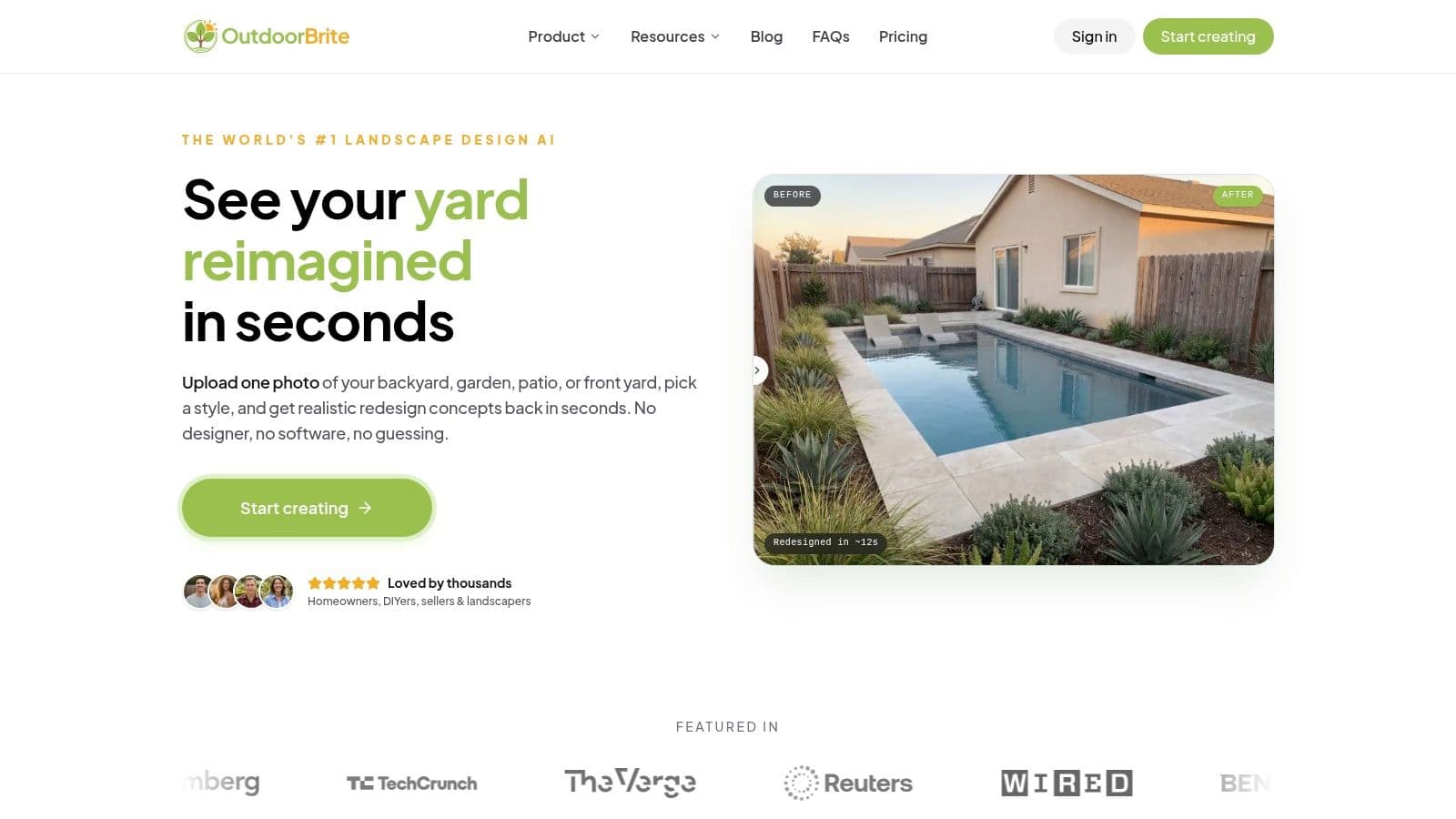
You upload a photo of your actual space, choose a style or describe what you want, and the app creates visual redesign concepts. Instead of trying to imagine how pavers, shrubs, lighting, or a new planting layout might work, you get an image that shows a plausible version of the finished yard.
Practical rule: If you can see an idea on your own property, you'll make better design decisions than if you only collect inspiration from other people's homes.
That's the part many people misunderstand. The “AI” isn't the point. The point is visual decision-making. The app helps you move from vague wish list to visible options.
For homeowners, that usually means less second-guessing. You can compare a modern low-maintenance yard with a softer cottage-style garden and quickly notice which one fits your house. For contractors and designers, it becomes a concepting tool that speeds up early conversations.
Here's the simplest definition. An AI landscaping app is a design tool that uses your photo and your prompts to generate yard concepts you can react to, edit, and share. It doesn't replace judgment. It gives judgment something concrete to work with.
How AI Transforms Landscape Design
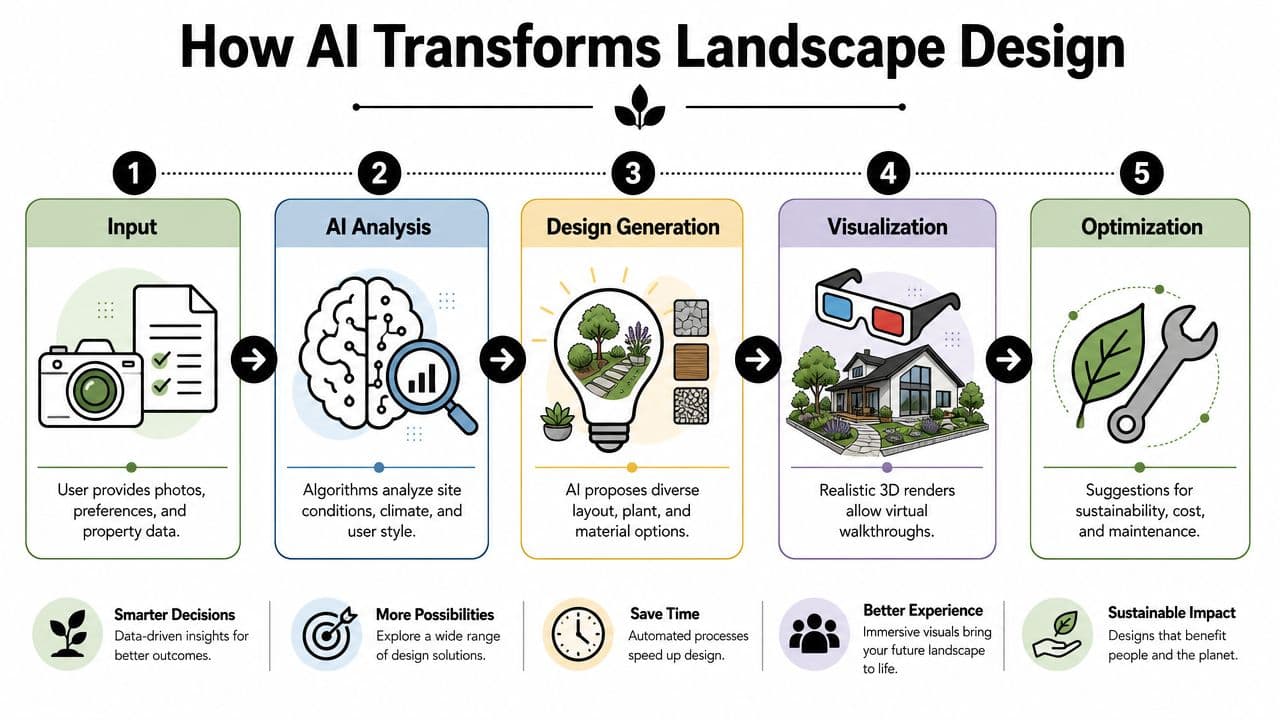
The easiest way to demystify the AI part is to stop thinking of it as a robot for outdoor design. It works more like a visual pattern engine. You give it an image, style cues, and sometimes a few preferences. It studies the scene and produces new design versions based on what it recognizes.
What the app is actually doing
At a practical level, most tools follow a similar pattern:
- They read the photo. The app looks at surfaces, edges, open areas, structures, planting zones, and major shapes.
- They interpret your direction. If you select modern, Mediterranean, lush, minimalist, or family-friendly, that steers the output.
- They generate visual concepts. The tool creates redesigned versions that combine layout ideas, materials, and planting styles.
- They let you iterate. You keep what works, reject what doesn't, and refine.
That's why an AI landscaping app often feels so much faster than the old method of sketching on paper, bouncing ideas back and forth by email, or trying to visualize a plan from flat notes. You aren't staring at a blank page. You're reacting to images.
A similar pattern is showing up in adjacent property industries. If you're curious how visual AI is changing client workflows beyond landscaping, this look at AI for real estate agents is useful because it shows the same core shift. Faster concepting, clearer presentation, and fewer slow handoffs.
Why this feels different from old design workflows
Traditional outdoor design planning often stalls at the same point. A homeowner has ideas, but can't picture the finished result well enough to commit. A professional may understand the solution immediately, but still needs time to turn that vision into something the client can see.
AI shortens that gap.
Instead of discussing a “gravel path with layered planting and a seating zone,” you can look at a version of it. Maybe the path feels too formal. Maybe the shrubs are too dense. Maybe the fire pit is exactly right, but the patio shape isn't. Those are productive reactions. They move the project forward.
Good landscape design gets easier when people stop debating words and start responding to images.
The biggest practical advantages usually come down to three things:
| Benefit | What it changes in real life |
|---|---|
| Speed | You can test multiple directions quickly instead of committing to one concept too early |
| Clarity | Family members, clients, and contractors can react to the same visual reference |
| Risk reduction | You can catch awkward choices before buying plants, stone, furniture, or labor |
The important mindset shift is this. Don't ask the app to be right on the first try. Ask it to help you think better, faster, and with fewer blind spots.
Key Features of a Great AI Landscaping App
Some apps are fun for casual inspiration. Others are useful enough to guide a real project. The difference usually comes down to whether the tool helps you make decisions, not just generate pretty pictures.
Features that improve the design itself
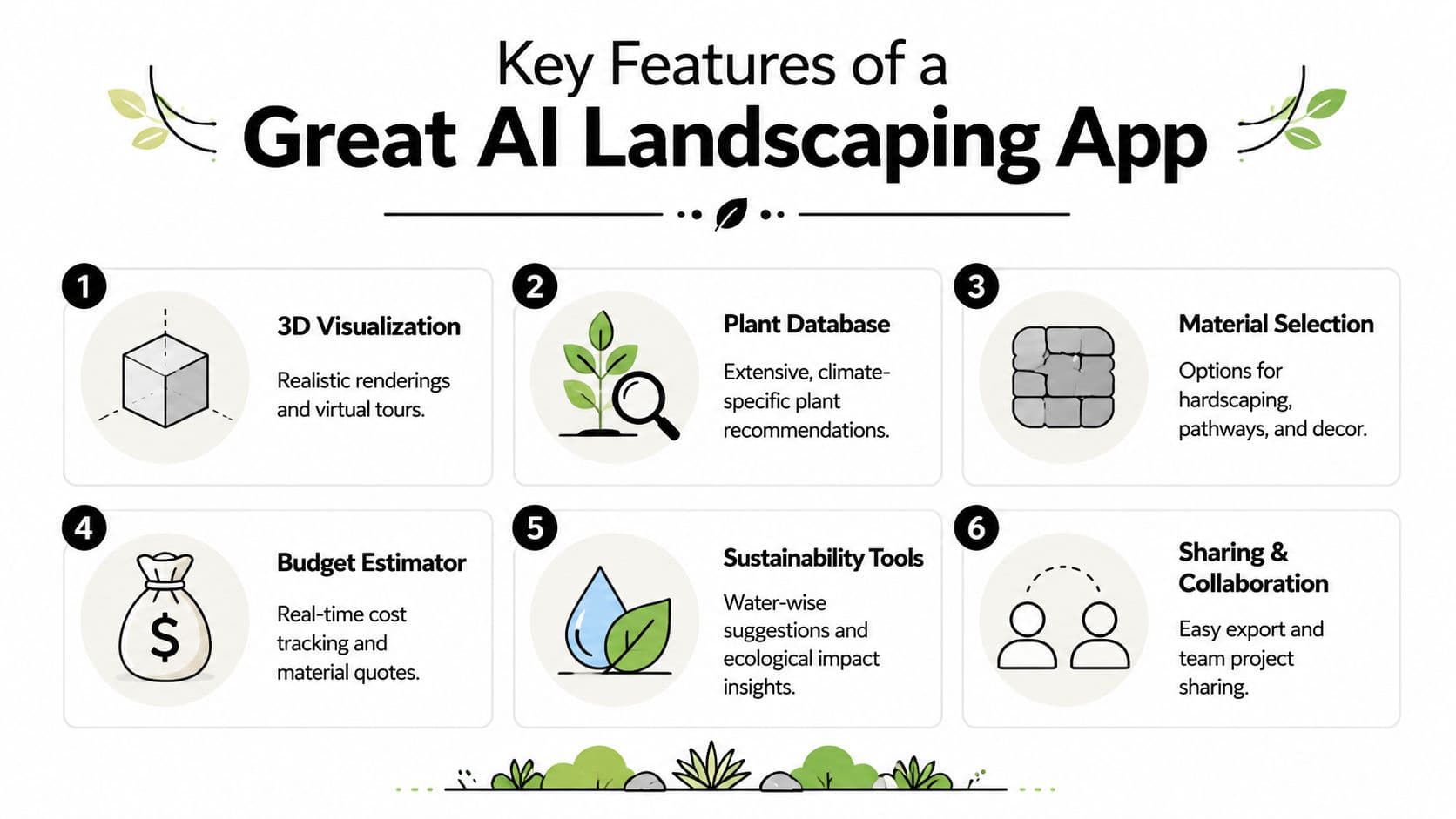
The first thing to look for is photorealistic rendering. If the output looks cartoonish or messy, you'll struggle to trust what you're seeing. Realistic shadows, believable materials, and coherent planting make a big difference because they let you evaluate mood and scale more accurately.
Next, look for style range. A strong app shouldn't trap you in one aesthetic. You want the option to test clean modern layouts, Mediterranean courtyards, naturalistic gardens, Japanese-inspired spaces, or a simple low-maintenance family yard. Different homes need different design languages.
A useful app also needs editing control. Generated images are only the starting point. You should be able to adjust plant density, switch hardscape materials, rethink furniture placement, or add focal elements like planters, a pergola, or a fire feature.
Here's where people often get stuck. They choose an app based only on flashy sample images. A better test is to ask, “Can I shape the result after it's generated?”
The best tool doesn't just surprise you. It lets you steer.
If you're comparing options, this guide to the best ai garden design software is helpful because it frames the choice around usability, not hype.
Features that make the app practical to use
Some features matter less for inspiration and more for real-world planning. Environment controls are one of them. If you can preview a design in different seasons, lighting conditions, or weather moods, you'll make smarter choices about plant structure, shade, and evening ambiance.
Then there's support for different outdoor zones. Many people don't need a full backyard redesign. They need help with a narrow side yard, a front entry, a patio, or an awkward corner near a fence. A strong app should handle more than one type of space.
The most practical apps also include tools like:
- High-resolution exports so you can share ideas with a contractor or save them for planning meetings
- Material guidance that helps you think through surfaces, edging, and finish combinations
- Plant suggestions that feel consistent with the chosen style
- Collaboration options for sharing designs with a spouse, client, or crew
Here's a simple comparison checklist:
| Feature | Why it matters |
|---|---|
| Realistic visuals | Helps you judge whether the design feels believable in your actual yard |
| Style variety | Prevents you from locking into the first aesthetic you see |
| Customization tools | Lets you refine instead of restarting from scratch |
| Season and lighting views | Shows how the space may feel beyond one perfect daytime image |
| Flexible space support | Works for patios, gardens, front yards, and mixed-use areas |
| Export and sharing | Makes the concept usable outside the app |
A great AI landscaping app should reduce friction. It should help you move from idea to decision with less confusion, fewer revisions, and a much clearer picture of what belongs in the space.
A Homeowners Guide to AI Yard Design
Most homeowners get better results when they treat the app like a design workshop, not a magic button. The workflow is simple, but each step affects the quality of the outcome.
Start with a better photo
Your photo is the foundation. If it's dark, angled awkwardly, or cluttered with temporary objects, the app has less to work with.
Try to take the image in even daylight. Stand far enough back to capture the full area you want redesigned. If possible, clear out hoses, toys, bins, or loose furniture that don't belong in the future plan. You want the app to see the space, not the distractions.
A few quick habits help:
- Shoot straight on so paths, patios, and borders are easier to interpret
- Include boundaries like fences, walls, and the house edge
- Avoid harsh shadows that hide planting beds or grade changes
- Take more than one photo if the yard has separate zones
If you want to experiment before paying for anything complex, a free landscape design app can be a smart place to learn what kinds of photos and prompts produce useful results.
Generate options before you customize
Once the image is uploaded, resist the urge to micromanage immediately. Start broad.
Pick a few distinct directions. For example, try one clean modern style, one softer garden-forward style, and one low-maintenance outdoor living concept. The goal isn't to fall in love with every image. The goal is to notice patterns in your own reaction.
Maybe you keep choosing layouts with wider patios. Maybe every design you save has layered greenery near the fence. Maybe you realize you don't want a lawn-centered yard anymore. That's valuable design information.
A good first round answers questions like these:
- Do you want more seating or more planting?
- Does your yard look better with structured lines or relaxed curves?
- Should the focal point be dining, lounging, gardening, or play?
- Do you prefer a lush look or a cleaner low-upkeep one?
Refine your favorite concept
Now switch from exploration to editing. It is during editing that the app starts paying off.
Take the concept with the strongest bones and improve it. Swap gravel for pavers if you want a more finished patio feel. Reduce planting density if you know you won't maintain a full layered border. Add a fire pit, outdoor kitchen zone, raised beds, or privacy screening only if the layout still feels balanced after the change.
This walkthrough gives a helpful sense of how visual refinement works in practice:
One mistake I see often is people editing too many things at once. Change one major element, then look again. If you alter the patio material, furniture style, plant palette, and circulation path in one pass, you won't know which decision improved the design and which one weakened it.
Save two or three finalists, not twenty. A short list is easier to compare and easier to discuss with other people.
When you're done, export the version that best communicates the idea. That image becomes a useful brief for family feedback, contractor conversations, or your own phased project planning.
How Professionals Use AI to Win Bids
A homeowner asks for "something cleaner, more usable, and a little more upscale," then stares blankly when the contractor starts talking about circulation, screening, and material changes. That moment decides a lot of bids. The firm that can turn vague words into a clear visual usually has the easier sales conversation.
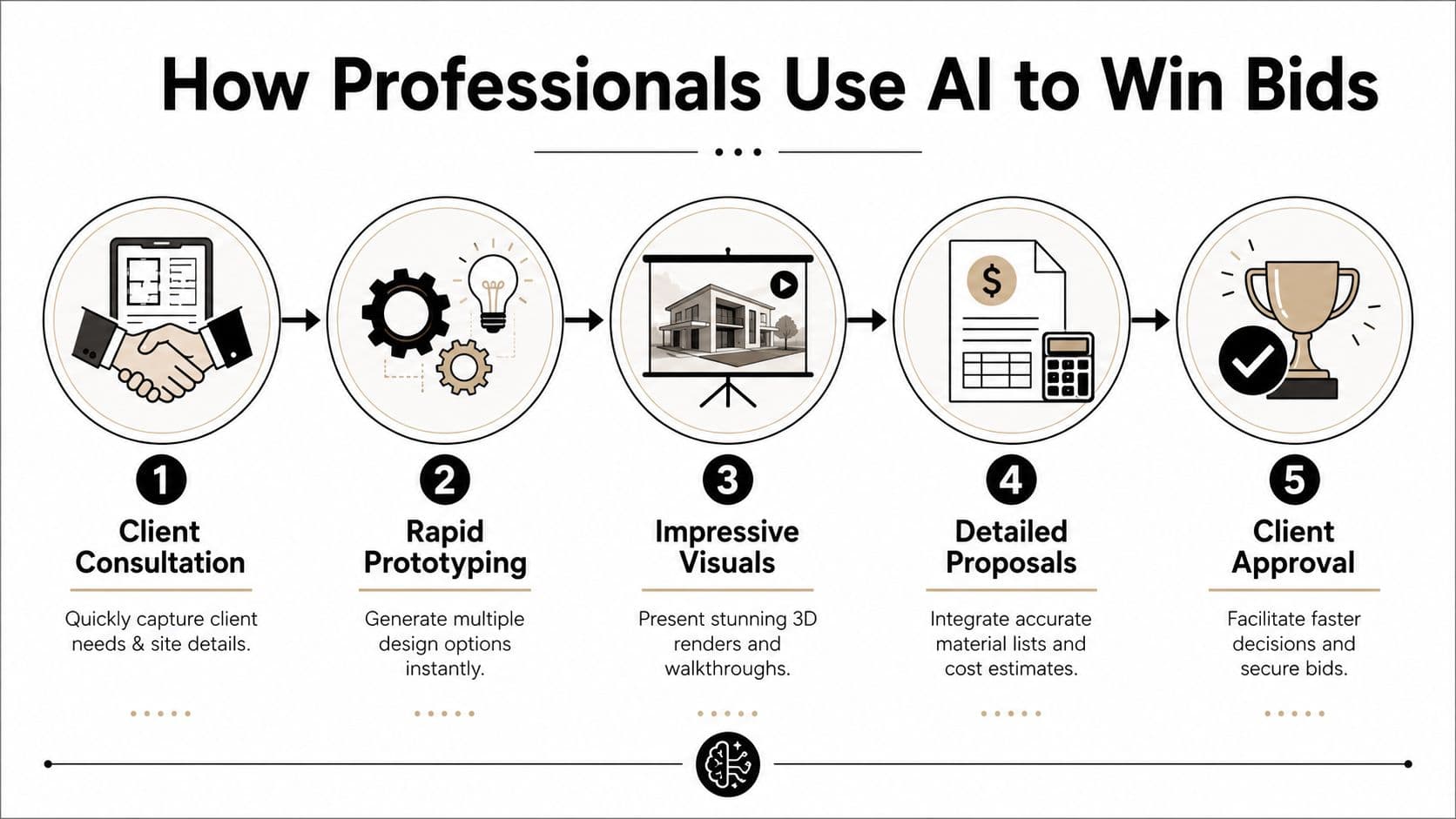
An AI design app helps professionals do exactly that. It works like a fast concept sketcher that speaks in images instead of technical jargon. Clients do not need to read a plan perfectly to react to a patio shape, a privacy screen, or a cleaner front entry. Once they can see an idea, they can make useful decisions.
Why clients say yes faster
Early visuals reduce hesitation because they give the client something specific to approve, question, or compare. A text-only estimate asks the homeowner to imagine the result. A concept image does some of that mental work for them.
That difference matters during competitive bidding. If one proposal explains the work and another explains it and shows the likely direction, the second often feels more thought through. The image does not need to be final. It needs to make the project feel understandable and worth discussing.
Professionals often use ai for landscape design in a few practical ways:
- During consultations to test style directions while the client is still engaged
- Inside proposals to make scope and value easier to grasp
- For revision rounds when a client wants the same layout to feel softer, simpler, or more private
- For curb appeal concepts when sellers or agents want a strong exterior idea before listing
There is also a business side to this. Better visuals can help win the conversation in front of the client, but firms still need qualified leads in the first place. The same logic applies beyond yard design. This guide on using AI for local SEO and ads is useful because it connects presentation tools with the marketing work that brings new prospects in.
Where pros still need judgment
The strongest firms use the app at the front of the process, then switch to real site knowledge. That is the strategic workflow.
A generated concept may look polished while ignoring drainage patterns, utility lines, access for equipment, grade changes, or plant fit for the region. In other words, the software is good at showing possibilities. The professional still has to filter those possibilities through budget, buildability, and long-term upkeep.
That is why AI is most helpful before detailed documentation starts:
| Stage | Best use of AI |
|---|---|
| Initial meeting | Generate options that help clients express preferences |
| Concept approval | Turn broad goals into a visual direction |
| Proposal delivery | Make the bid clearer and more persuasive |
| Detailed planning | Shift to measurements, sourcing, permits, and build decisions |
Used well, the app shortens the gap between "I am not sure what I want" and "yes, this feels right." That saves design time, reduces revision fatigue, and gives professionals a cleaner path to approval.
Common Pitfalls and Your Next Steps
AI yard design works best when you expect the right things from it. It's a visualization and ideation tool. It is not a substitute for site measurement, plant knowledge, local code awareness, or build sequencing.
Mistakes that lead to bad results
The first common mistake is trusting a weak photo. If the app can't clearly read the space, the design output may look attractive but feel disconnected from the actual yard.
The second mistake is treating the first image as final. Good results usually come from comparing, rejecting, tweaking, and rerunning. People who use an AI landscaping app well tend to behave more like editors than passive users.
The third mistake is assuming every suggested plant or material belongs in your region, budget, or maintenance routine. Always sanity-check the concept. A beautiful image still needs real-world judgment.
A few guardrails help:
- Use the image as a concept board, not a construction document
- Verify plant fit locally before buying anything
- Check access and drainage conditions before locking in hardscape ideas
- Translate visuals into a phased plan if the full project feels too big at once
A design that looks right on screen still has to work on your property, in your climate, with your level of upkeep.
Quick FAQ
Can an AI outdoor design app replace an outdoor space designer? Not fully. It can help you explore ideas quickly and communicate clearly, but professional designers still bring site judgment, technical planning, and horticultural knowledge.
Is it only for big backyards?
No. These tools can also help with patios, front entries, side yards, garden beds, and awkward corners.
Do I need design experience to use one well?
No. You just need a clear photo, a willingness to compare options, and a basic sense of how you want to use the space.
What's the best first move if I feel overwhelmed?
Start with one photo and test a few sharply different styles. Don't search for perfection. Search for direction.
If you're a contractor, one more practical next step is worth considering. Once you have stronger concept visuals, think about how nearby clients will discover your business in the first place. That's where broader digital strategy matters, and resources like the article above on AI-assisted local marketing can complement your design workflow well.
If you're ready to turn rough yard ideas into visuals you can use, OutdoorBrite Money is a strong place to start. It helps homeowners and professionals upload a photo, explore style directions, and create polished outdoor concepts without a steep learning curve.
See your yard reimagined
Start creating