7 Free AI Garden Design Options for 2026
Explore free AI garden design tools, trials, planners, and low-cost methods for creating realistic yard concepts, plant lists, and actionable plans.
A free AI garden design result isn't automatically a usable garden plan. A polished image can still show the wrong plant for your climate, ignore drainage, distort dimensions, or leave you with a watermarked file you can't share. Compare the free credits, plant specificity, regional recommendations, seasonal views, exports, and whether each tool produces inspiration or something useful for shopping and contractor conversations. The design software market is projected to grow from $0.7 billion in 2025 to $1.4 billion by 2034, according to MarketIntelo's landscape design software report, but the practical question remains simple: what can you do with the result after the render appears? This roundup covers seven routes to free or low-cost value, from plant-aware concepts and mobile experimentation to precise edits, execution planning, DIY guidance, vegetable-bed scheduling, and strategic use of a paid tool's free access. OutdoorBrite is also a relevant paid alternative for photo-based concepts, style comparisons, refinement, and shareable redesigns.
Table of Contents
- 1. Yard Studio
- 2. FlorAI
- 3. AI Garden Design (landscapedesign.io)
- 4. Ogrovision
- 5. Yard AI
- 6. AI Yard Planner
- 7. FurrowGrow
- Free AI Garden Design, 7-Tool Comparison
- Turn the Free Concept Into a Safer Plan
1. Yard Studio
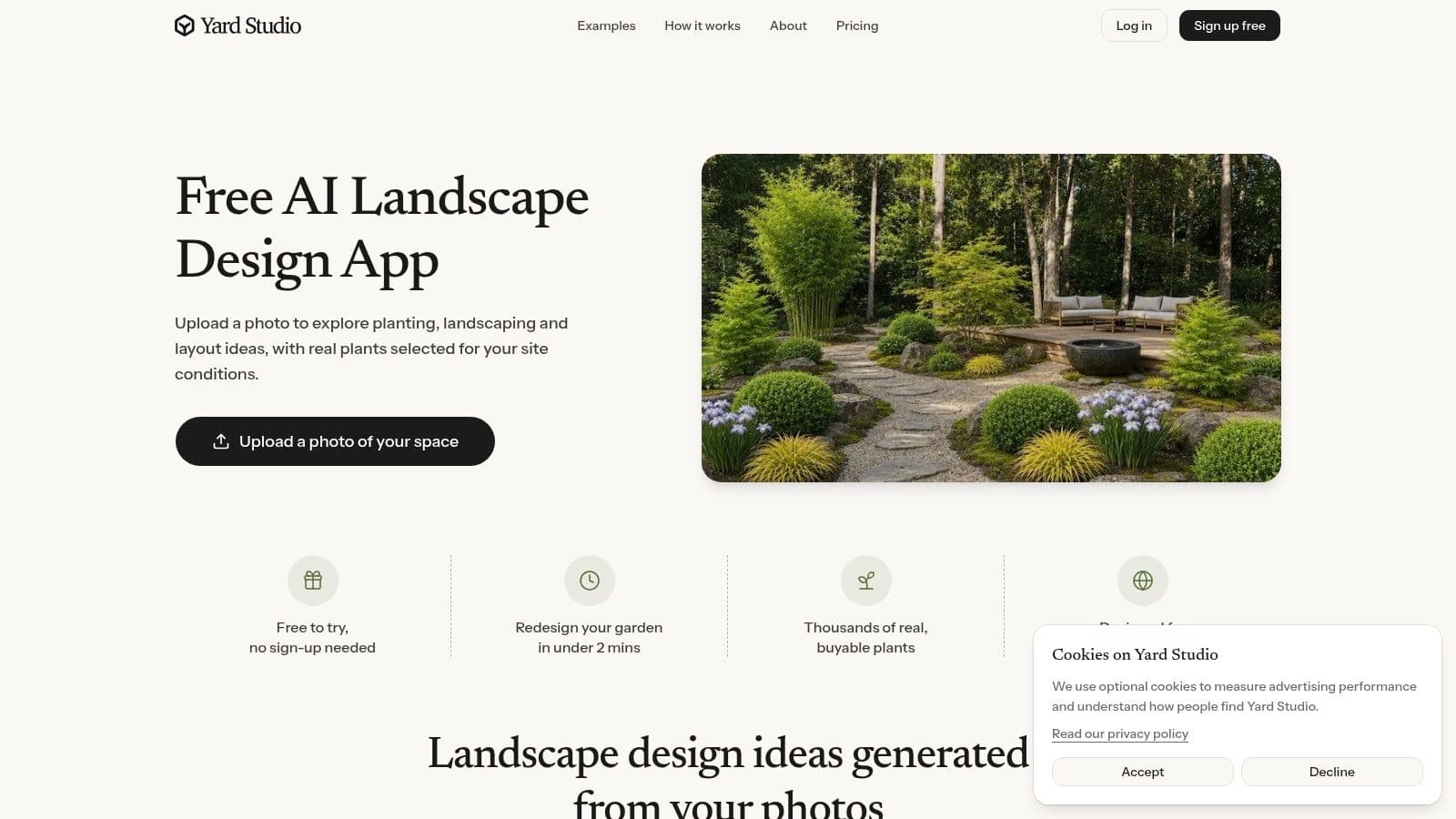
Yard Studio's AI landscape design tool is the strongest choice here when a garden image needs to lead toward an actual plant-shopping conversation. Upload a photo, preserve the existing house, fence, driveway, and other fixed elements, then test modern, cottage, Mediterranean, tropical, Japanese, or vegetable-garden directions. Its key advantage is named plants, so the result can support a nursery discussion instead of serving only as decoration.
Plant selections are filtered around hardiness zone, sun, and soil, with a route toward real, buyable species. That improves early planting decisions, but the list still needs site-level checking. Confirm exposure, drainage, mature size, pests, and water restrictions before ordering anything. A plant name is a useful research brief, not proof that the plant will perform in your garden.
Where the free access helps
Yard Studio is easy to test without creating an account, and its free-credit policy is clearly presented. You can compare broad directions, then refine a preferred image by swapping plants, removing features, or regenerating one section. That workflow gives free users more practical testing than a single attractive render.
Free exports are watermarked, so the no-cost route suits private evaluation, mood boards, and early conversations where the mark is acceptable. Polished client or contractor presentation material requires considering the upgrade.
Practical rule: Use the render to settle the visual direction, then use the plant list as a research brief, not as a construction document.
Yard Studio is less suitable for complex grading, drainage, retaining walls, or detailed site engineering. For a wider comparison, see this guide to best free garden design software. Choose Yard Studio when plant awareness matters more than technical layout precision.
2. FlorAI
FlorAI takes a broader, more mobile-friendly approach to free AI garden design. It runs across iOS, Android, and the web, so you can photograph a neglected border on your phone, revisit the concept from a desktop, and share before-and-after images without being tied to one device. The core workflow is straightforward. Upload an outdoor photo, choose a visual style, and generate a redesigned version of the yard, patio, or smaller garden area.
The style library includes modern, cottage, Japanese, Mediterranean, minimalist, and related directions. That range is useful when you're still deciding whether your space needs a restrained planting palette, a layered cottage border, or a more structured hardscape treatment. FlorAI also adds plant identification and plant-health helpers, which gives it a practical role after the redesign. You can use the visual tool for future ideas and the plant tools to understand what's already growing in the garden.
Best for quick experiments
FlorAI is marketed as free to start, not as an unlimited free planning service. Treat that wording as a signal to test the workflow before investing time in a large project. Some features may sit behind an in-app subscription after the initial free use, so check what you can generate, save, and share before building your whole design process around it.
Its plant suggestions are best treated as general guidance. A visual model may recognize a broad planting character without giving you a reliable species recommendation for your region. Confirm every suggested plant with a local nursery, extension service, or knowledgeable designer, particularly where heat, frost, soil, or water availability creates tight limits.
- Use the photo redesign for: Comparing whole-yard styles and testing the mood of a makeover.
- Use Plant Scan for: Identifying existing plants before removing or relocating them.
- Use the health helper for: Generating a starting point for care research, not a definitive diagnosis.
- Check before buying: Species names, mature dimensions, sunlight needs, and local availability.
FlorAI works well for homeowners who want low-friction visual experimentation plus basic plant helpers. It's less compelling when the priority is a detailed plant schedule, precise takeoff, or contractor-ready plan.
3. AI Garden Design (landscapedesign.io)
AI Landscape Design is built for speed and clear limits. Its iPhone and Android app creates photo-based garden concepts in 18 outdoor styles, while attempting to preserve the property's basic geometry. The first full-resolution render gives you a quick test of the visual results before you spend time exploring paid features.
The app also generates a labeled plant list matched to the user's area. Use it to narrow options, then verify each suggestion for the actual site. A regional match does not confirm suitability for a shaded courtyard, exposed roof terrace, poorly drained bed, or the specific microclimate of a side yard.
A good short-listing tool
Free access is easy to understand. The service advertises three free designs to start and separates those features from Pro capabilities. That makes testing more predictable, since you can decide what to evaluate before uploading a full set of project photos.
Use each design to answer a different planning question:
- Test the overall style: Compare modern, cottage, or Mediterranean ideas with the existing architecture.
- Test the planting character: Assess the balance among lawn, shrubs, perennials, and trees.
- Test the hardscape idea: Check whether a path, patio, or revised bed shape improves circulation.
Pools, detailed beds, lighting, and other deeper tools require a subscription. The resulting image also remains conceptual. It does not establish grades, structural loads, utility clearances, drainage capacity, irrigation design, or permit requirements.
A convincing render can help a contractor understand your taste. It cannot replace the measurements and drawings required for safe construction.
Homeowners comparing interfaces and workflows can also review this overview of landscape software for homeowners. Choose this app for fast mobile concepts, plant labels, and plainly stated free limits. Turn the preferred image into a site checklist by confirming measurements, mature plant size, water needs, and construction constraints before buying materials.
4. Ogrovision
Ogrovision's AI garden design visualizer is the most useful option in this list for controlled image edits. Upload a garden photo, choose from more than 100 presets, or describe a custom direction. Instead of regenerating the entire scene whenever one detail is wrong, you can use masks and zones to target a particular bed, path, fence, or planting area.
That distinction matters in real garden planning. You may like the existing patio but want to replace a tired lawn, or you may want to test a gravel strip without changing the mature tree near the house. Masking gives you a better chance of preserving the parts that already work. Seasonal variants also help you question whether a design has year-round structure or only looks attractive in one imagined moment.
Useful outputs beyond a pretty image
Ogrovision can provide plant recognition and care advice, save project history, and create a planting-plan PDF. A PDF is more convenient than a loose image when you're comparing ideas with a nursery or collecting notes for a contractor. It still shouldn't be mistaken for a measured planting plan, particularly if the document doesn't reflect accurate scale, quantities, spacing, irrigation, or site levels.
Free signup credits let you try the service before buying more. Advanced features consume more credits per render, so targeted edits are the sensible way to stretch the free allowance. Start with a clear photo and one change at a time. If you ask for a complete redesign, a seasonal version, and several masked edits in one session, the credits can disappear before you've learned much.
The main regional limitation is that Ogrovision originated outside the United States. Plant availability links and recommendations may skew toward another market, so verify every species and supplier locally. Use the tool for precise visual comparisons and organized concept sharing, then translate the result into a regional plant palette.
5. Yard AI
Yard AI offers a useful split between a free visual starting point and a paid execution layer. The free access provides a first photorealistic design from your own photo, with seasonal previews for spring, summer, fall, and winter. That makes it a good fit for homeowners who want to see whether a proposed garden has enough structure beyond its peak season.
The more practical planning features are included in its paid Landscape Plan. That layer can add DIY or professional cost estimates, action plans with tutorials, climate-matched plant guides, shopping lists with retailer links, local contractor matching, shareable plan links, and PDF export in beta. In other words, Yard AI is less about pretending that one free render is a finished plan and more about showing the route from concept toward execution.
Where the free version ends
The free design is valuable for choosing a direction, but most of the information needed to buy materials or organize work sits behind the paid plan. That's a fair trade-off if your immediate question is visual. It's a limitation if you expected a free bill of materials, maintenance schedule, or regional sourcing list.
Use the first render deliberately. Ask whether the proposed bed locations fit how you move through the yard, whether the seating area is placed where you'll use it, and whether the style reflects your maintenance tolerance. Seasonal views can expose designs that depend too heavily on flowers or foliage that won't persist throughout the year.
The execution-oriented plan can help frame a conversation, especially for U.S. homeowners, but regional cost ranges aren't a substitute for local quotes. A contractor still needs measurements, access information, utility locations, grading details, and any permit requirements.
Best use: Treat the free render as a project brief. Upgrade only if the planning layer answers questions you're genuinely ready to act on.
For another photo-based route, explore backyard AI design when you want to compare redesign ideas on the actual property. Yard AI is the better fit when budgeting, maintenance, shopping, and contractor discussions matter almost as much as appearance.
6. AI Yard Planner
AI Yard Planner is deliberately lighter than a full visualizer. It works from a garden or yard photo and focuses on early-stage decisions for backyards, front yards, garden beds, and patios. You can start with five free credits, where one concept uses one credit, then compare the resulting before-and-after views through sliders.
The useful difference is the accompanying plain-English planning guidance. Instead of stopping at an image, the tool can discuss planting direction, materials, maintenance, budget ranges, and a next-step checklist. That won't produce CAD drawings, but it can make a vague idea easier to explain at a nursery or in an initial contractor conversation.
Good for DIY decisions
The four clear style directions, Native garden, Warm modern, Cottage layered, and Drought-smart, keep the choices manageable. A limited menu can be an advantage when you're trying to make a decision rather than browse endless presets. The Drought-smart direction is particularly relevant for homeowners who want lower-maintenance planting, though any generated recommendation still needs to reflect local water rules, soil, rainfall, and plant availability.
AI Yard Planner's species suggestions are directional. Confirm exact plants for your zone and site before purchasing, and ask whether the mature spread fits the bed shown in the image. Also check whether the proposed materials make sense for your soil, slope, access, and maintenance routine.
The tool is a sensible companion to a visual generator. Use it when you need a short written rationale for a concept, not when you need accurate quantities or construction details. Its lightweight workflow makes it suitable for a weekend planning session, especially when the next step is gathering local prices or asking a professional whether the idea is feasible.
For additional DIY planning context, see the SteadStack garden planning blog. AI Yard Planner is the right choice when you value simple guidance and next actions over photorealistic detail.
7. FurrowGrow
FurrowGrow solves a different problem from the photo-first tools above. It's a free planner for vegetable and herb gardens, not a photorealistic backyard makeover. Enter a U.S. ZIP code, garden size, sun exposure, and maintenance level, then use the generated layout, planting calendar, and shopping list to organize an edible bed.
That focus is valuable because ornamental design tools often show attractive raised beds without answering the operational questions that determine whether the garden succeeds. What should be planted, when should it go in, how much space is available, and which crops fit the gardener's willingness to maintain them? FurrowGrow is designed around those decisions.
Best for productive beds
You can include or exclude crops according to your preferences. That makes the plan more personal than a generic vegetable list. A first-time grower might use the lower-maintenance setting and remove crops the household won't eat, while a more experienced gardener can shape the plan around preferred herbs and vegetables.
The ZIP-aware workflow is helpful for a U.S. starting point, but it isn't a guarantee of success. Sun exposure can vary within the same yard, and local frost timing, soil conditions, pests, watering access, and microclimates can change the recommendation. Treat the calendar as an initial schedule, then confirm it with a local growing guide or nursery.
FurrowGrow also won't show how the edible area fits visually with a patio, fence, lawn, or ornamental border. Pair it with a photo-based concept tool if the project combines food production with a broader outdoor redesign.
Choose FurrowGrow when the desired output is a productive bed plan and planting schedule, not a curb-appeal render. It's a particularly practical complement to the other options because it turns the vegetable portion of a garden into a sequence of tasks rather than a single image.
Free AI Garden Design, 7-Tool Comparison
| Tool | 🔄 Implementation complexity | ⚡ Resource requirements | 📊 Expected outcomes | Ideal use cases | ⭐ Key advantages / 💡 Tips |
|---|---|---|---|---|---|
| Yard Studio | Low, photo upload + preset styles; edit/iterate tools | Web app; free trial; paid exports to remove watermark | Photoreal landscape concepts + named, zone-aware plant lists | Homeowners & landscapers seeking concept visuals + plant recommendations | ⭐ Provides buyable, zone-filtered plant lists; 💡 verify local availability |
| FlorAI | Low, mobile-first onboarding, simple photo workflow | iOS/Android/Web; "free to start" with in‑app subscription | Before/after concepts, plant ID and health diagnostics (general) | Mobile users wanting quick concepts plus plant ID/health checks | ⭐ Cross-platform + plant tools; 💡 expect paywalled features after trial |
| AI Landscape Design (landscapedesign.io) | Low, very fast renders (~10s); preset-driven | Mobile app; three free designs; Pro subscription for advanced tools | Rapid photoreal concepts with named plants matched to area | Fast concept exploration for homeowners | ⭐ Transparent free limits and plant naming; 💡 upgrade for pools/advanced details |
| Ogrovision (AI Garden Design) | Moderate, many presets plus masking/zones for precise edits | Web-based; free signup credits, inexpensive credit packs for more renders | High-control before/after visuals, seasonal variants, planting-plan PDFs | Users needing precise edits, seasonal previews, and exportable plans | ⭐ Strong masking and seasonal previews; 💡 monitor credit usage; regional plant links may vary |
| Yard AI | Moderate, adds execution-focused planning on top of visualization | Web/mobile; free first design, paid "Landscape Plan" for detailed outputs | Photoreal concepts + execution plans (cost ranges, materials, contractor matches) | Homeowners ready to budget and execute projects | ⭐ Bridges concept to execution with cost estimates; 💡 most execution features behind paywall |
| AI Yard Planner | Low, lightweight photo-to-concept with clear scope | Web-based; 5 free signup credits; simple style options | Practical concept visuals plus plain‑English planning notes and budget ranges | DIY homeowners comparing early-stage layout/options | ⭐ Actionable planning notes and checklists; 💡 plant species suggestions are directional only |
| FurrowGrow | Low, form-based ZIP-aware planner (no photoreal visuals) | Web-based; free; ZIP-code required for climate-aware plans | Custom vegetable/herb layouts, planting calendar, shopping list | Vegetable/herb gardeners needing planting schedules and layouts | ⭐ Purpose-built for edibles with planting calendars; 💡 complements ornamental visualizers for aesthetics |
Turn the Free Concept Into a Safer Plan
Free AI garden design works best as an early decision tool. It can help you compare a cottage border with a drought-smart layout, visualize a new patio position, identify a planting character, or organize a vegetable bed. It can't reliably establish exact grades, drainage, structural requirements, irrigation capacity, property boundaries, or permit-ready construction details from a single photograph.
Start by saving the original photo, the prompt, the selected style, and every useful output. Keep the concepts together so you can compare them without relying on memory. Test distinctly different directions rather than generating near-identical variations, and look for practical consequences: where people walk, where water drains, how much lawn remains, and whether the maintenance burden matches your routine.
Verify the plant names before buying anything. Check the species against local hardiness conditions, sunlight, soil, mature size, water needs, seasonal behavior, and nursery availability. The AI survey linked to IFLA's 2025 findings reports that about half of respondents were already incorporating AI into practice, while only 10% used machine-learning or AI-based design tools specifically. The same survey found that AI users most often applied those tools in early design phases, which fits the safest role for consumer garden generators.
Review the export before you share it. Check for watermarks, resolution limits, missing plant labels, and whether a PDF contains real measurements or only formatted suggestions. A visually persuasive image can start a conversation with a nursery, designer, or contractor, but it shouldn't be presented as a measured or permitted plan.
Choose based on the decision you're trying to make:
- Yard Studio: Plant-aware concepts with named species and zone-related filtering.
- FlorAI: Cross-platform experimentation with plant identification and health helpers.
- AI Garden Design: Fast mobile concepts with transparent free limits and labeled plants.
- Ogrovision: Masked edits, seasonal variants, project history, and planting-plan PDFs.
- Yard AI: A free visual starting point with paid execution-oriented planning.
- AI Yard Planner: Lightweight planning notes for homeowners and DIY discussions.
- FurrowGrow: ZIP-aware vegetable-bed layouts, schedules, and shopping guidance.
OutdoorBrite is another relevant route when you want to upload a photo of your actual yard, test styles, refine a redesign, and share realistic concepts before committing to plants, pavers, or a contractor. Use any free result as a way to clarify what you want, then let local expertise resolve what the image can't know.
OutdoorBrite turns a photo of your backyard, garden, patio, or front yard into realistic redesign concepts you can compare, refine, and share across styles such as cottage, Mediterranean, Japanese zen, and xeriscape. Visit OutdoorBrite to test your own space and turn a free AI garden design idea into a clearer brief for your next project.
See your yard reimagined
Start creating