
AI Landscape Design App: How It Works and How to Pick One
Learn what an AI landscape design app does, which features matter, how the photo-to-concept workflow runs, and how to judge results before you hire.
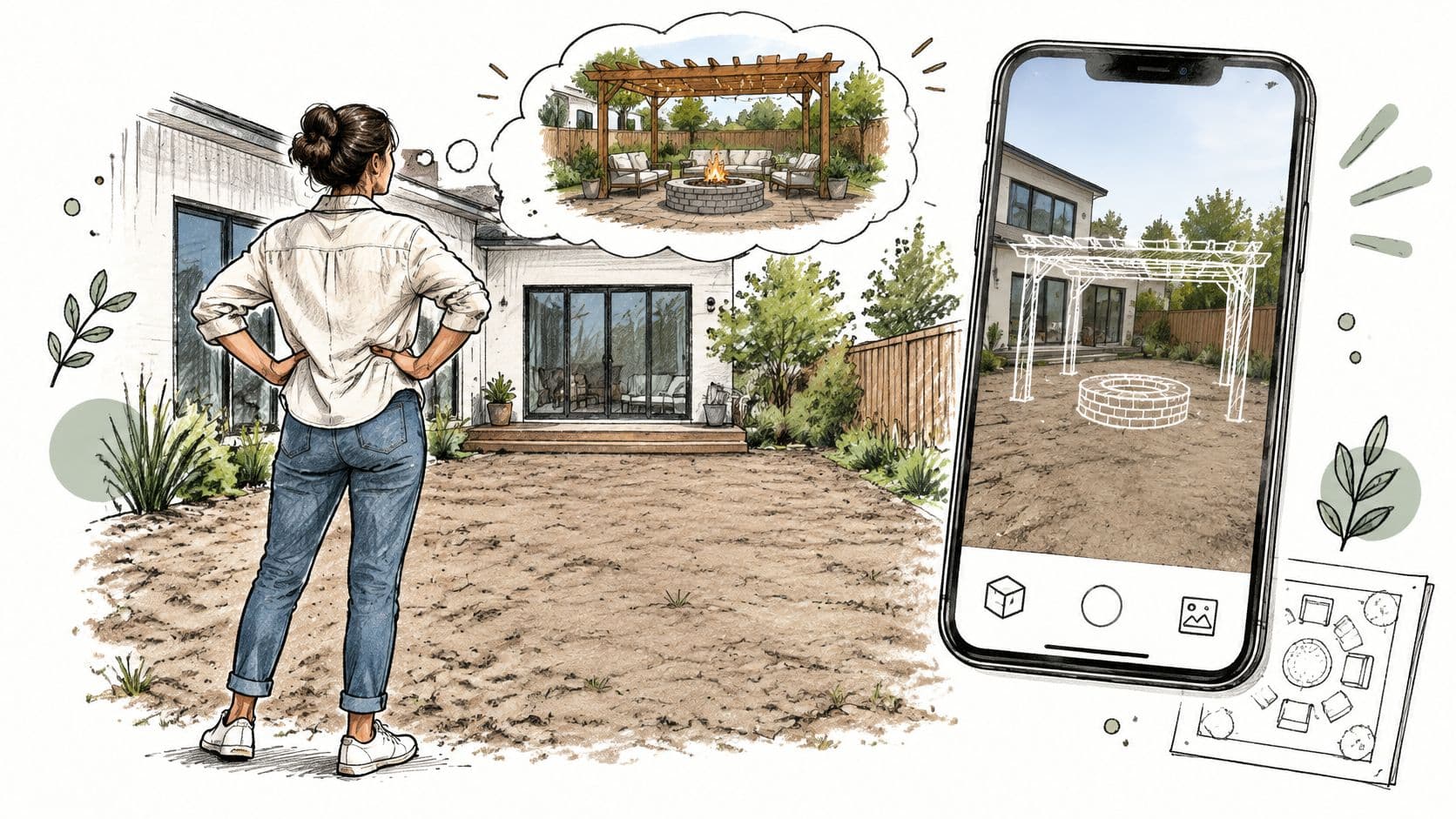
You're standing in the bare patch behind your house, trying to decide where a pergola would go and whether there's room left for a fire pit. A paving sample helps you choose a color, but it doesn't help you picture the whole yard. An AI yard design app can make that conversation easier, provided you know which parts of the picture to trust.
Table of Contents
- What an AI Landscape Design App Actually Does
- Core Features and What Each One Does
- How to Go from Photo to Concept in Six Steps
- How the App Reads Your Yard Before It Redesigns It
- Who Gets Value from These Apps and How
- Judge the Tool and the Concept Before You Spend
What an AI Landscape Design App Actually Does
An AI landscape design app is software that takes a photo of an existing outdoor space and generates redesigned versions in a chosen style. You supply the view, select a direction, and receive visual concepts to compare, refine, and share.
Think of laying tracing paper over a photograph of your yard. Instead of drawing every shrub and paving joint yourself, you ask the software to sketch alternative treatments over the same scene.
From an empty patch to a visible idea
Say your backyard has a narrow lawn strip beside a concrete slab. A modern concept might show restrained planting and simple furniture; a cottage version might introduce layered borders; a Mediterranean interpretation might suggest warmer paving and textured planting.
The useful question isn't whether one image looks expensive. It's whether you can finally explain what you want: more screening along the fence, seating near the door, or planting that softens the slab.
This is the sort of visual comparison a homeowner can make from a phone.
These tools belong to the broader expansion of generative AI. Stanford's 2025 AI Index reported that global private investment in generative AI reached $33.9 billion in 2024, supporting the technology ecosystem behind consumer image-generation tools.
The visual principle also appears in property marketing. Pinnacle Property Media's guide to helping buyers visualize empty living spaces offers a useful parallel: showing a possible arrangement helps people discuss a space they struggle to imagine.
Keep the distinction clear: A convincing picture communicates an intention. It doesn't verify that intention.
For an introduction focused on outdoor decisions, a homeowner's guide to AI yard planning provides additional context. The essential boundary remains straightforward: a generated concept isn't a site survey, a planting schedule, or construction drawings.
Core Features and What Each One Does
Read the What to Check column first. A feature name tells you what a company offers; the condition attached to it tells you whether you can use it for your project.
For example, an elements editor is useful when you can deliberately position a pergola over an existing patio. It's less useful if requesting a pergola causes the app to redraw the entire garden.
Core features, what they do and what to check
| Feature | What It Does | What to Check |
|---|---|---|
| Photo upload | Uses a backyard, patio, garden, or front-yard photo as the starting image | Use a straight-on daylight photo; confirm accepted file formats and file size |
| Style presets | Restyles materials and planting with looks such as modern, cottage, Mediterranean, tropical, Japanese zen, or xeriscape | Whether you can combine styles or select only one at a time |
| Multiple concepts | Produces alternative treatments of the same space | The stated variant allowance and whether the underlying layout stays fixed |
| Elements editor | Adds or removes fire pits, pergolas, and planting beds | Whether you can place items deliberately, whether they snap to positions, or whether control is prompt-only |
| Refinement | Adjusts or regenerates a selected concept | Regeneration allowances, credit charges, and whether edits affect only the selected area |
| High-resolution download | Exports images for presentations and contractor briefs | Actual pixel dimensions and watermark rules for the plan you're considering |
| Sharing | Sends concepts to family, clients, or contractors | Whether recipients can open shared links without creating an account |
| Subscription pricing | Provides recurring access to generations and downloads | Trial terms, billing frequency, cancellation rules, and cost per usable concept |
Choose controls that match your decision
Style presets should change the treatment, not the footprint. A tropical option may suggest broad-leaved planting, but that doesn't justify making your patio deeper or moving a gate.
Likewise, refinement should help you preserve a successful choice. If you like the seating layout but dislike the border, look for masking, region selection, or another way to revise the planting without losing the seating arrangement.
Don't subscribe solely because the preview looks sharp on a phone. Open a sample export on the device you'll use for contractor discussions, and inspect small details such as steps, paving edges, and furniture legs. Confirm that the paid plan provides the export and editing functions you need.
How to Go from Photo to Concept in Six Steps
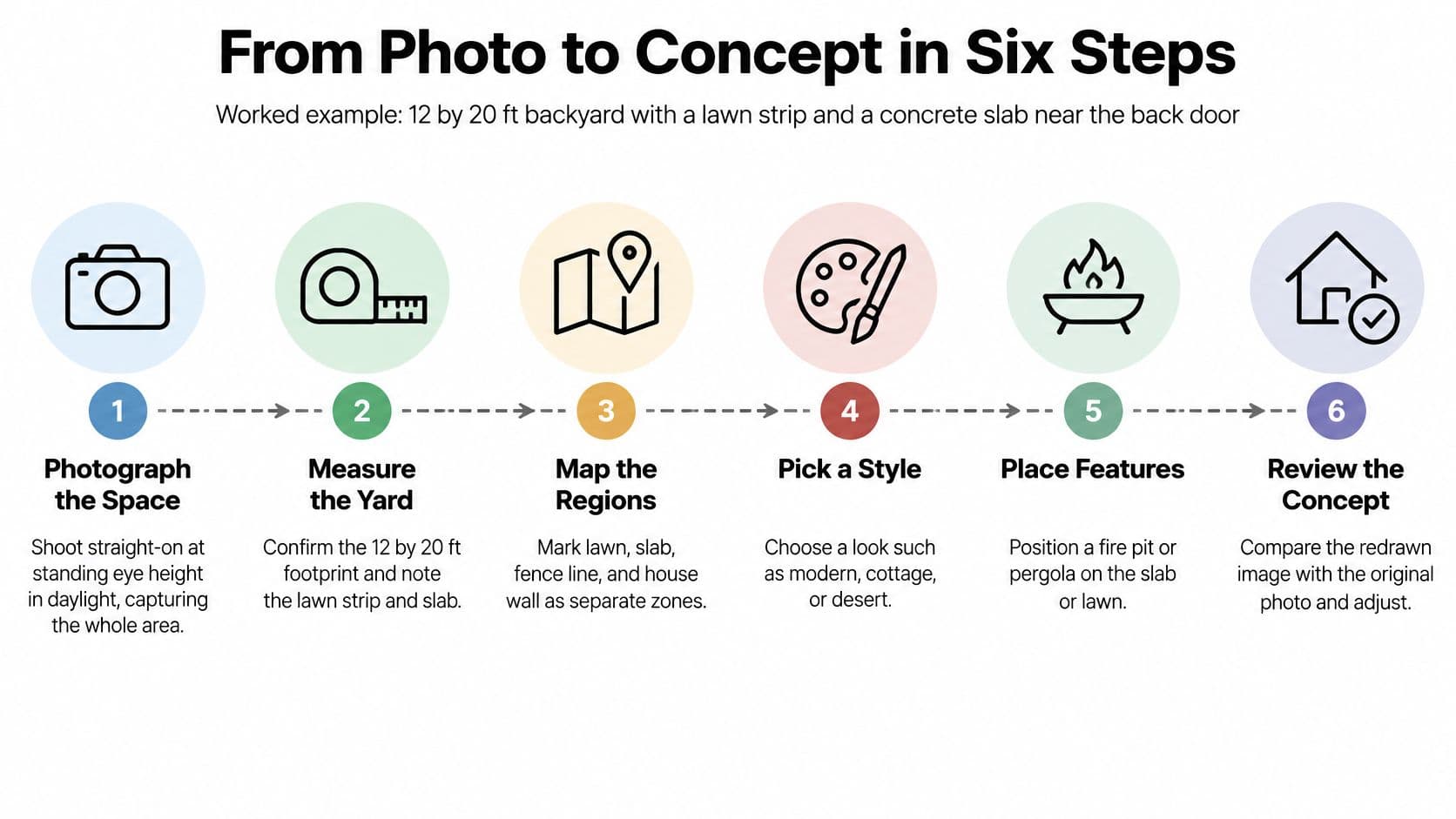
Consider a hypothetical 12 by 20 ft backyard with a lawn strip and a concrete slab near the back door. Your aim is to explore shade over the slab and planting along the fence, not to redesign every visible surface.
Use the process graphic as a preparation checklist, especially for measuring and identifying separate yard regions.
Prepare the image, then make deliberate changes
-
Photograph the whole space. Stand at eye height and shoot straight-on in daylight, keeping the slab, lawn, fence, and house edge visible. Cropping out the gate or tilting the camera can hide the very constraint that should guide your design.
-
Upload and check the boundaries. Measure the footprint separately, then confirm that the app distinguishes the lawn from the slab and recognizes features you intend to keep. Don't assume a fence line in the photograph proves the legal property boundary.
-
Choose a style that supports your goal. Try modern for clean lines, cottage for layered planting, or xeriscape as a starting direction where water is limited. The common slip is choosing an attractive label without considering the maintenance or planting implications.
-
Position the proposed elements. Place shade over the slab and a bed along the fence, using your measurements to guide their apparent proportions. Don't accept a pergola merely because it looks balanced in the image; its footprint, posts, and relationship to doors need checking.
-
Generate alternatives and compare use. Follow the route from the back door to the gate, check the view from indoors, and consider where chairs would pull out. A dramatic focal point isn't helpful if it occupies your main walking route.
-
Refine and save the strongest direction. Adjust the chosen concept, download the clearest available image, and record what you want to retain. Avoid making so many simultaneous changes that you can't tell which decision improved the design.
Furniture deserves its own fit check. Tyner Furniture's resource on how to check furniture fit with virtual previews illustrates the value of viewing furnishings in context, although outdoor circulation still needs physical measurement.
For a video companion to your photo-to-concept exercise, use the embedded player.
A usable result keeps your existing structures recognizable and makes your proposed changes easy to explain.
Save the original photo alongside the selected concept. Your notes should distinguish changes you actively requested from decorative details the generator introduced on its own.
How the App Reads Your Yard Before It Redesigns It
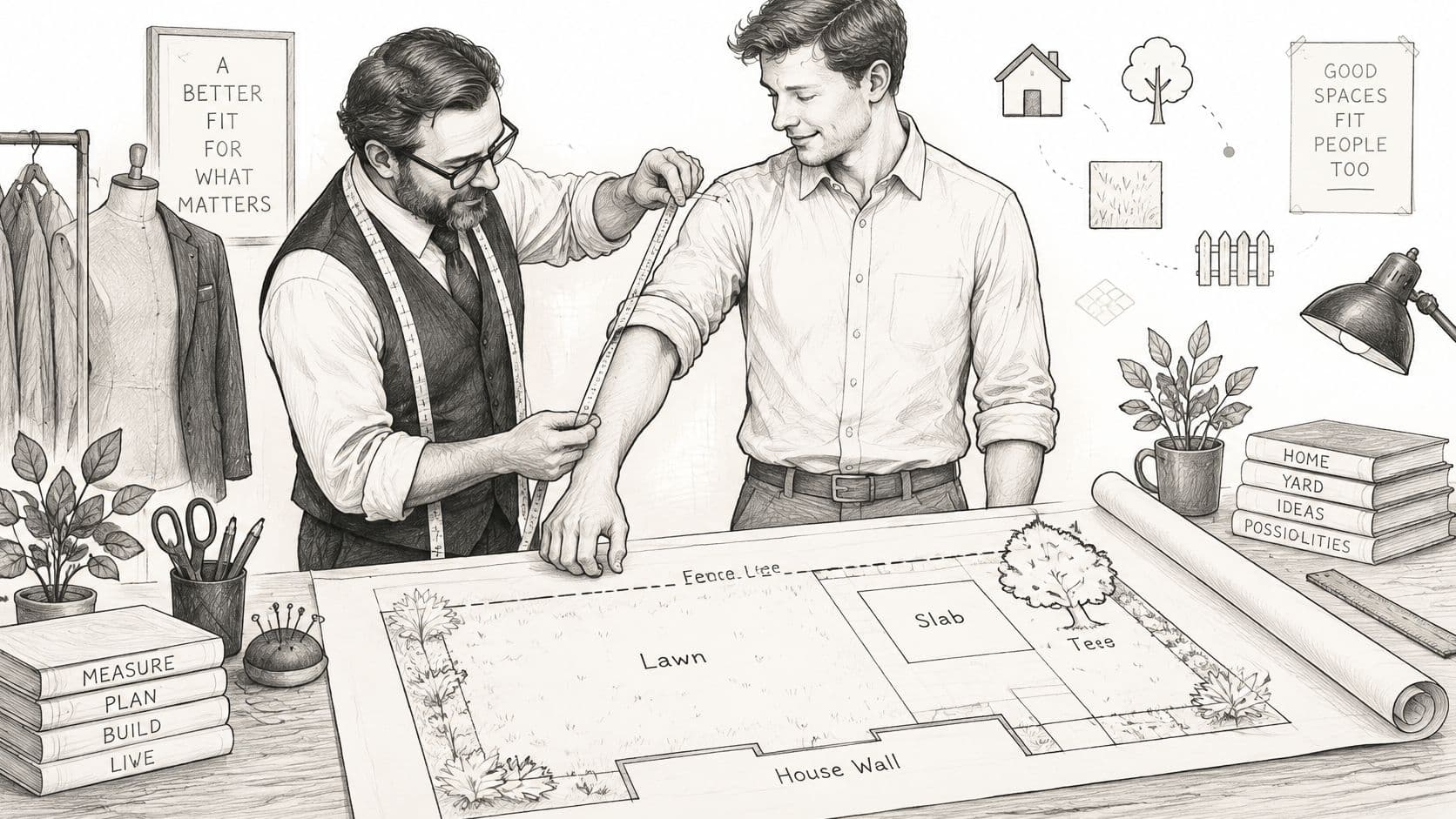
A good tailor measures before cutting cloth. A good yard visualization workflow similarly identifies what's already in the yard before applying a new appearance, although interpreting a photograph isn't the same as measuring the site.
The technical distinction is between scene understanding and image generation. Scene understanding identifies regions and objects, such as lawn, paving, fence, tree, and house wall. Image generation creates the proposed appearance within that scene.
The tailor analogy is useful because fit must come before finish.
Why structural constraints matter
The UrbanGenAI paper describes a workflow combining OneFormer panoptic segmentation, Stable Diffusion XL, and ControlNet. In plain language, segmentation maps the scene, the diffusion model generates the new image, and structural conditioning helps keep that generation aligned with the original layout.
Without adequate constraints, a generator can create an appealing garden while duplicating a fence, shifting a pergola, or replacing a tree you wanted to preserve. That isn't a harmless styling difference when you're trying to discuss work on an actual property.
You don't need to recognize the model names to evaluate the result. You need a reliable comparison method.
- Trace fixed edges: Compare the house wall, slab corners, fence posts, and gate position against the original.
- Inspect object continuity: Check that trunks, steps, rooflines, and paths haven't merged or disappeared.
- Test local corrections: Change one bed or feature and see whether unrelated parts of the image remain stable.
- Look for honest labeling: Generated plants and structures should be presented as approximate proposals, not verified specifications.
What the photo still leaves out
A scene map identifies visible surfaces. It doesn't establish soil depth beneath paving, underground services, or the direction water travels during heavy rain.
Use site analysis for landscape projects to understand the broader site information a design needs. For the image itself, reject or correct any candidate that changes a structural feature without your instruction, even if the resulting picture is more attractive.
Who Gets Value from These Apps and How
A couple planning a small patio may agree on the materials but struggle to picture how seating, planting beds, and the lawn edge will fit together. An AI outdoor design app can turn those preferences into a visual proposal. Homeowners' outdoor upgrades often involve plants, beds, and seating together, so comparing these elements in one image can help clarify choices.
User groups, main goals and limits
| User Group | Main Goal | Most Useful Output | Main Limit |
|---|---|---|---|
| Homeowners and DIYers | Test ideas before buying plants, pavers, or contractor services | Alternative concepts compared side by side | Plant and material choices aren't verified for the site |
| Home sellers and real estate agents | Explore curb-appeal improvements before listing | Clearly labeled proposed front-yard images | Images mustn't imply an unbuilt yard already exists |
| New-build owners | Organize a blank yard | Zoned concepts for patio, lawn, and beds | The image contains no verified soil, grading, or drainage information |
| New homebuyers and recent movers | Adapt a yard they didn't plan | Style direction for a phased project | Visual appearance alone doesn't establish whether existing features are removable |
| Landscaping contractors and designers | Explain a proposed finished appearance | Client-ready images with annotated changes | Scope and price still require site assessment |
| Homeowners hiring a landscaper | Give bidders a clear brief | An annotated concept attached to a quote request | It isn't a substitute for a site survey |
Match the output to the next conversation
Choose an image that helps answer a specific question. If your household is deciding where to entertain, compare how the seating relates to the house, lawn, and planting beds. If you're speaking with a contractor, mark which surfaces should stay and which are possible replacements.
The render works best as a communication layer between you and a professional: it makes preferences easier to discuss, but it is not a buildable plan. Keep preferences distinct from decisions. Write “screening desired here,” rather than treating an unidentified rendered hedge as an approved plant selection. Write “retain existing slab if suitable,” rather than assuming it can support every feature shown above it.
For client presentations: Separate existing conditions, proposed changes, and items awaiting verification.
For sellers, clear labels help distinguish a possible improvement from the property's current condition. Keep the original view available alongside any altered image, so viewers can tell what is proposed.
New owners can use the concept to prepare questions before committing to changes. Photograph established features before removing anything. A mature tree, retaining edge, or older drain may affect the project even if it is not prominent in the render. Ask the appropriate professional whether those features can be changed, and confirm site conditions before spending money. The app can help you explain what you want; it cannot establish what is safe or feasible to build.
Judge the Tool and the Concept Before You Spend
A tool can produce a beautiful image while overlooking the conditions that determine whether plants survive. Gardenful's review of AI landscape design apps flags weaknesses involving mature plant size, species identification, drainage, sunlight, soil, wind, reflected heat, and local rules; it also treats hardiness-zone filtering as a first pass, not a survival guarantee.
That matters because realism can encourage misplaced confidence. You may scrutinize an obvious sketch while accepting a photographic-looking planting arrangement without asking what species it contains.
Compare tools with the same test yard
Use the same source photo and comparable instructions across competing apps. Ask each to retain the existing slab, fence, and tree while changing a defined planting area, then inspect the outputs against these criteria.
Evaluation criteria for choosing a tool
| Criterion | What Good Looks Like | Red Flag |
|---|---|---|
| Layout preservation | Original fences, house lines, and trees remain consistent | Structures jump, duplicate, or disappear |
| Export quality | A clear high-resolution sample representative of the plan you'd buy | You can't inspect usable export quality before committing |
| Element control | Features can be deliberately placed and their proposed size adjusted | Every feature is controlled only through free-form prompts |
| Style range | Distinct treatments, including climate-led directions such as xeriscape | Near-identical outputs under different labels |
| Regional or climate input | Requests location, sun, water, or other site conditions | No climate input despite claims of site suitability |
| Sharing and collaboration | Recipients can easily open concepts and understand annotations | No practical way to deliver a readable concept to collaborators |
| Pricing transparency | Clear billing, trial terms, and generation allowances | Credit limits or export restrictions emerge only after payment |
Use Best landscape design apps to assemble candidates, but let your own test photo determine which deserves closer consideration. Count rejected images and editing effort when judging value, not just the advertised generation allowance.
A conceptual garden-generation study available through PubMed Central evaluates image fidelity and perceptual quality alongside human judgments of layout, function, and graphics. Visual plausibility and practical validity are separate tests, so a polished rendering should never be your only acceptance criterion.
Run the site reality check
Before ordering, turn the appealing features into explicit questions.
- Plant identity and mature size: Confirm botanical names, locally available substitutes, and mature height and spread. Check whether branches or roots would conflict with paths, walls, or services.
- Climate and exposure: Check hardiness suitability, seasonal sun, wind, reflected heat, and water availability. A sheltered coastal bed and an exposed inland bed need different scrutiny even when their rendered appearance is similar.
- Soil and drainage: Assess soil conditions and observe where water collects or flows. Don't copy a proposed bed that would obstruct an existing drainage route.
- Structures and access: Measure doors, gates, routes, slopes, and proposed footprints. Verify property lines, utilities, applicable permissions, and construction requirements with the relevant professionals or authorities.
Reviews compiled by AI Tools Bakery distinguish inspirational visualizations from specification-grade planning and identify gaps around drainage, grading, permits, soil testing, and measurement. They also caution that cost accuracy is difficult to verify because labor and material prices change by region and season.
Turn the concept into a contractor brief
Attach the original photo and annotated concept to a concise written brief. Mark must-stay items, measured dimensions, known drainage paths, sun direction, desired changes, and unresolved questions; show confirmed boundaries separately from assumptions.
State your priorities in order, such as shade before decorative lighting, and identify work you might phase. Ask bidders to explain site corrections, exclusions, plant specifications, and the basis of their quantities so you can compare equivalent scopes.
Treat any image-based budget as an early discussion range, not a purchasing authorization. Spend only after the relevant measurements, selections, and construction details have been checked.
OutdoorBrite offers photo-based redesign concepts for outdoor spaces that you can compare, refine, and share with the people involved in your project. Visit OutdoorBrite, upload a clear yard photo, and annotate your strongest concept with what must stay, what you'd like to change, and what a professional needs to verify before quoting.
See your yard reimagined
Start creating