Landscape Material Calculator: A Step-by-Step Guide
Learn how to use a landscape material calculator for mulch, pavers, and sod. Step-by-step formulas, wastage tips, and real examples included.
You're standing beside a half-empty pile of mulch, a tape measure, and a delivery receipt that doesn't match what your yard appears to need. The planting bed looked simple from the patio. On the ground, it curves around a tree, narrows beside the steps, and changes to river stone near the gate. A quick length-times-width estimate was never going to handle that cleanly.
That's where a material calculator earns its place. The useful ones don't just produce a cubic-yard figure. They help connect area, depth, paver coverage, sod coverage, waste, and material changes so you can order with a plan instead of relying on a hopeful guess. Before comparing tools or entering measurements, it helps to understand why estimating goes wrong so easily, especially when a project also affects your backyard landscaping costs 2026.
Table of Contents
- Why Estimating Materials Is Harder Than It Looks
- The Three Formulas Every Estimate Rests On
- Calculating Mulch and Soil by Volume
- Calculating Pavers and Sod by Count and Area
- Handling Irregular Yards and Mixed Material Builds
- Choosing the Right Calculator for Your Project Type
- Turning Calculator Outputs Into a Real Project Plan
Why Estimating Materials Is Harder Than It Looks
A homeowner usually discovers the problem at the worst possible moment. The mulch delivery is spread across the driveway, the crew is ready to wheelbarrow it into the beds, and the pile looks smaller than expected. The original estimate covered the rectangle beside the garage, but not the narrow strip along the fence or the circular bed around the maple. The result is a half-finished project and another delivery to arrange.
The opposite mistake is just as frustrating. A paver order includes too much material because the estimate ignored the actual pattern, cuts, and unusable edge pieces. Returning heavy pallets costs time, and some products can't be returned once they've been opened or mixed. A calculator helps, but only if the inputs reflect the finished design rather than the easiest shape to measure.
Three material families, three different estimating problems
Modern landscaping calculators commonly serve three planning categories:
- Bulk materials, including mulch and soil, require area, depth, and volume conversion.
- Hardscaping, including pavers and retaining-wall materials, depends on surface area, unit coverage, and cutting allowance.
- Turf planning, including sod and grass seed, starts with usable lawn area and ends with rolls or pallets.
A 2026 App Store listing for a landscaping calculator app describes 10 separate calculators covering soil, mulch, concrete, pavers, retaining walls, grass seed, and sod, which illustrates how the category has expanded beyond a single yardage estimate (Apple App Store landscaping calculator listing). A separate calculator directory also places mulch, paver, and sod modules together, reflecting the way real projects combine several material types rather than treating each conversion as an isolated task.
The practical difficulty comes from stacking different measurements. Mulch is ordered by cubic yards, pavers by pieces or surface coverage, and sod by rolls or pallets. Each estimate also needs a realistic allowance for cuts, breaks, trimming, settling, or uneven ground.
Depth is a design decision, not a minor input
A bed covered at 3 inches and the same bed covered at 4 inches don't require nearly the same volume. Increasing depth from 3 inches to 4 inches raises the required volume by about 33.3% (landscape material calculator guidance). That's why a calculator that hides the depth conversion can produce a polished-looking answer that still underorders material.
Practical rule: Measure the finished footprint first, choose the intended depth by material, then decide how much overage the site conditions justify.
The calculator's job is to make those decisions visible. It can't correct a footprint that excludes a side bed, and it can't know whether a curved edge will create substantial offcuts. Good estimating starts with a clear sketch and ends with quantities that match the way the yard will be built.
The Three Formulas Every Estimate Rests On
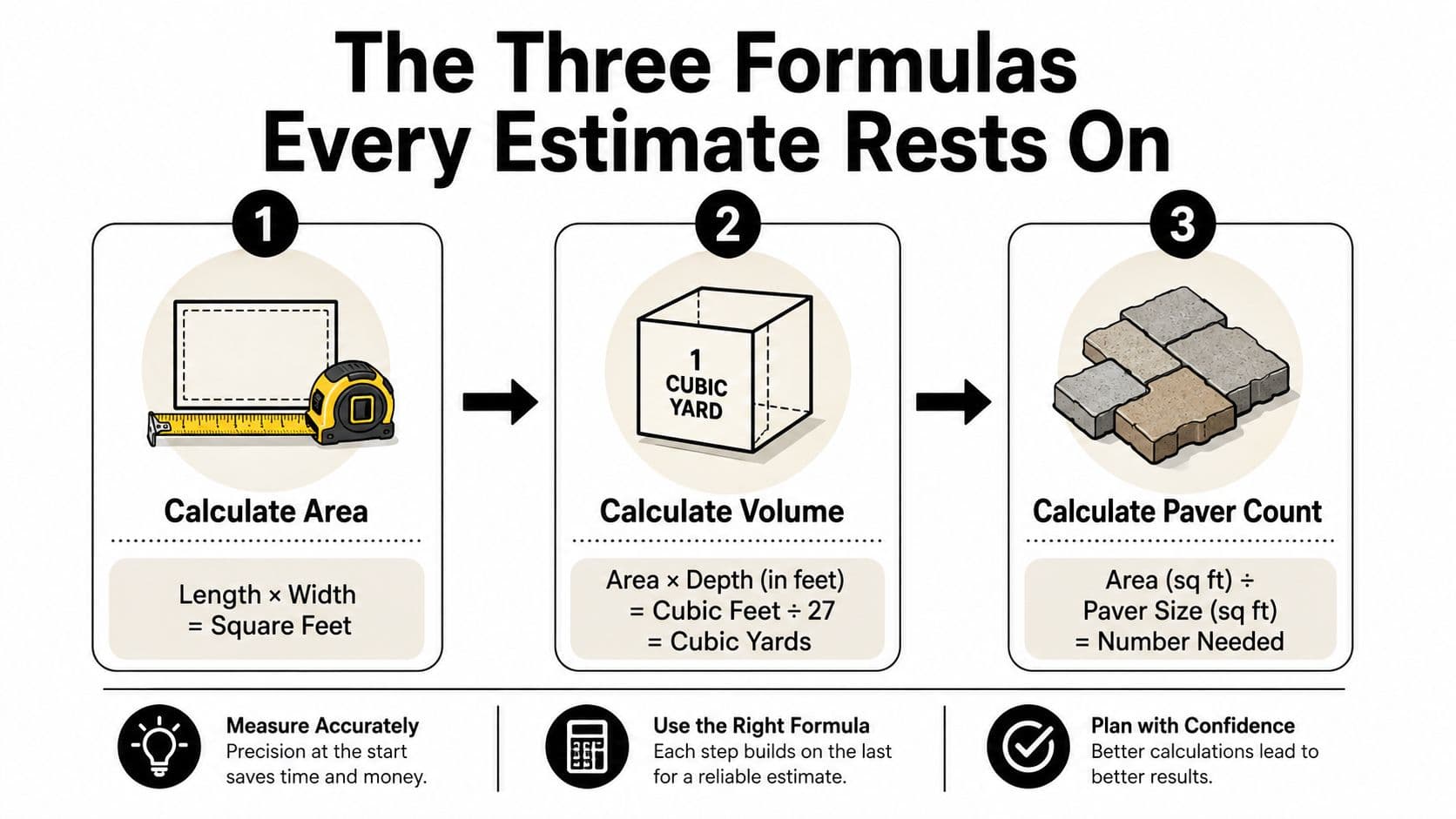
Every useful calculator is applying a small set of formulas behind the interface. Knowing them gives you a way to check the result, catch a unit mistake, and explain the estimate to a supplier or contractor.
Start with area
For a rectangle:
Length × width = square feet
Suppose a garden bed measures 12 feet by 15 feet. Its area is:
12 × 15 = 180 square feet
That 180-square-foot figure is the foundation for mulch, soil, pavers, sod, and many other calculations. If the bed isn't rectangular, calculate manageable sections separately and add them together rather than forcing the whole footprint into one average rectangle.
Convert area into volume
Bulk materials need depth. The cleanest method is to convert inches into feet before calculating:
Area × depth in feet = cubic feet
For the same 180-square-foot bed covered with 3 inches of mulch, 3 inches equals 0.25 feet. The volume becomes:
180 × 0.25 = 45 cubic feet
A cubic yard contains 27 cubic feet, so divide the cubic-foot result by 27:
45 ÷ 27 = 1.67 cubic yards
You'd normally round up to the supplier's available quantity, while also considering the site's waste and settling conditions. The 27-cubic-foot conversion is a common point of failure because people either forget it or divide by the wrong unit (standard cubic-yard calculation guidance).
Calculate pavers by coverage
Pavers use a count formula rather than a loose-volume formula:
Total area ÷ coverage of one paver = base piece count
If one paver covers 1 square foot, a 180-square-foot surface requires 180 pavers before cuts and breakage. If the individual paver covers a different area, use that verified coverage instead of assuming the piece count from its dimensions.
For a hardscape with many edge cuts, the base count isn't the final order. The calculator should let you add an overage and then round to a whole piece, package, or pallet. This is also where a design drawing matters, because a running-bond pattern and a modular pattern can create different cut requirements even when their total areas match.
The video below reinforces the visual relationship between measurements, materials, and a finished plan.
Use these formulas as a sanity check, not as a replacement for careful measurement. A calculator can perform the arithmetic quickly, but you still control the shape, depth, units, and ordering assumptions.
Calculating Mulch and Soil by Volume
A 200-square-foot bed can require very different orders. A light mulch refresh, a deep planting bed, and a lawn soil build may share the same footprint while using sharply different volumes. Mulch, topsoil, compost, bark, and similar products are sold by volume, so area alone cannot produce a dependable estimate.
Use this formula:
Cubic yards = length in feet × width in feet × depth in inches ÷ 324
The 324 converts inches to feet and accounts for 27 cubic feet in one cubic yard. You can also multiply the area by depth in feet, then divide by 27. Both methods agree when every measurement uses consistent units (bulk material volume conversion).
Work from footprint to order
Return to the 12-by-15-foot bed. At 3 inches deep:
12 × 15 × 3 ÷ 324 = 1.67 cubic yards
That 1.67 cubic yards is the calculated requirement, not automatically the final order. Supplier selling increments, curved edges, uneven grades, low spots, and measurement limits all affect the quantity you should buy. Round upward when a shortfall would leave part of the bed unfinished, then set the buffer according to the material and site conditions.
Depth must match the installation, not a default value in the calculator. Use these practical benchmarks as a starting point:
| Material or use | Reference depth |
|---|---|
| Bark mulch | 3 inches |
| River stone | 4 inches |
| Soil for lawns | 4 inches or more |
| Garden soil in flower beds | 6 to 12 inches |
| Pathways | 4 inches |
The depth chart reference shows why these entries cannot be treated as interchangeable. River stone serves as a surface layer, while lawn soil supports establishment. Entering one shared depth for both will distort the order.
Why one inch matters
Volume rises directly with depth. Moving from 3 inches to 4 inches requires about 33.3% more volume (coverage and depth guidance). That increase may suit a pathway or a particular soil build, but it is not harmless rounding.
Before placing a bulk order, check four inputs:
- The footprint includes every section receiving that material.
- The depth describes the finished layer, not the excavated hole.
- The units match, especially when measurements combine feet and inches.
- The rounded quantity matches supplier increments and known site conditions.
Irregular beds need one more check. Split them into rectangles, triangles, or measured zones, calculate each zone separately, then add the volumes before applying the ordering buffer. A dependable calculator should expose those inputs and state whether depth means inches or feet. If it hides either detail, verify the result manually before ordering.
Calculating Pavers and Sod by Count and Area
A patio can have the right measured area and still produce the wrong order. The pattern creates cuts, the border changes coverage, and a few broken units can leave the crew short on installation day. Pavers and sod both begin with usable area, but the purchase is made in complete pieces, rolls, or pallets.
Pavers need a pattern-aware count
Measure the finished hardscape area, then divide it by the coverage of one paver or its package. That gives the theoretical count. It does not include cuts at walls, curves, steps, posts, drains, or material transitions.
Use a 10% waste factor for typical paver cuts and breakage, following hardscape waste-factor guidance. Apply the allowance to the calculated quantity, then round up to whole units or packaging quantities. Treat that percentage as an ordering buffer, not as a replacement for a layout. Running patterns, border courses, and diagonal installations all change where cuts occur.
A layout can expose waste before the order is placed. Mark the field, borders, corners, steps, and fixed obstacles. If one area repeatedly produces narrow offcuts, adjust the pattern or expect additional units.
For a mixed patio, calculate the main field and border separately when their paver sizes differ. A border may use larger units with another coverage rate, while the field may need more cuts around the perimeter. Keep each material line separate so a change in one design zone does not force a complete rebuild of the estimate.
Sod begins with net lawn area
Sod follows a different counting process:
- Measure each lawn section separately.
- Subtract permanent planting beds, patios, walkways, driveways, and other hardscape.
- Add a trimming allowance based on the shape.
- Divide the adjusted area by the verified coverage of one roll or pallet.
- Round up to whole purchase units.
Simple rectangular lawns need less trimming allowance than curved, angled, or obstacle-heavy areas. The sod coverage guide provides a practical reference for matching the allowance to site complexity. A lawn wrapping around trees or narrowing between beds creates more scraps, even when the measured area is accurate.
Verify the supplier's unit coverage before ordering. Pallets and rolls do not all cover the same area, and package descriptions may already include a seam or installation allowance. As noted in the mulch section, each additional inch of depth adds roughly a third to the required volume. The same principle applies to any layered build.
Sod is measured by the lawn you can lay, not by the total open space visible from the street.
Finish with a site sketch. Mark permanent obstacles, material boundaries, and the direction of installation. That drawing connects the area estimate to a purchasing list the delivery crew can use.
Handling Irregular Yards and Mixed Material Builds
Most real yards wrap, taper, and break into separate zones. Beds turn around corners, paths widen near patios, and lawn areas split around trees or structures. A calculator that accepts only one length and one width may perform correct arithmetic on the wrong shape. The estimating mistake is usually in the model, not the multiplication.
Split the site before you calculate
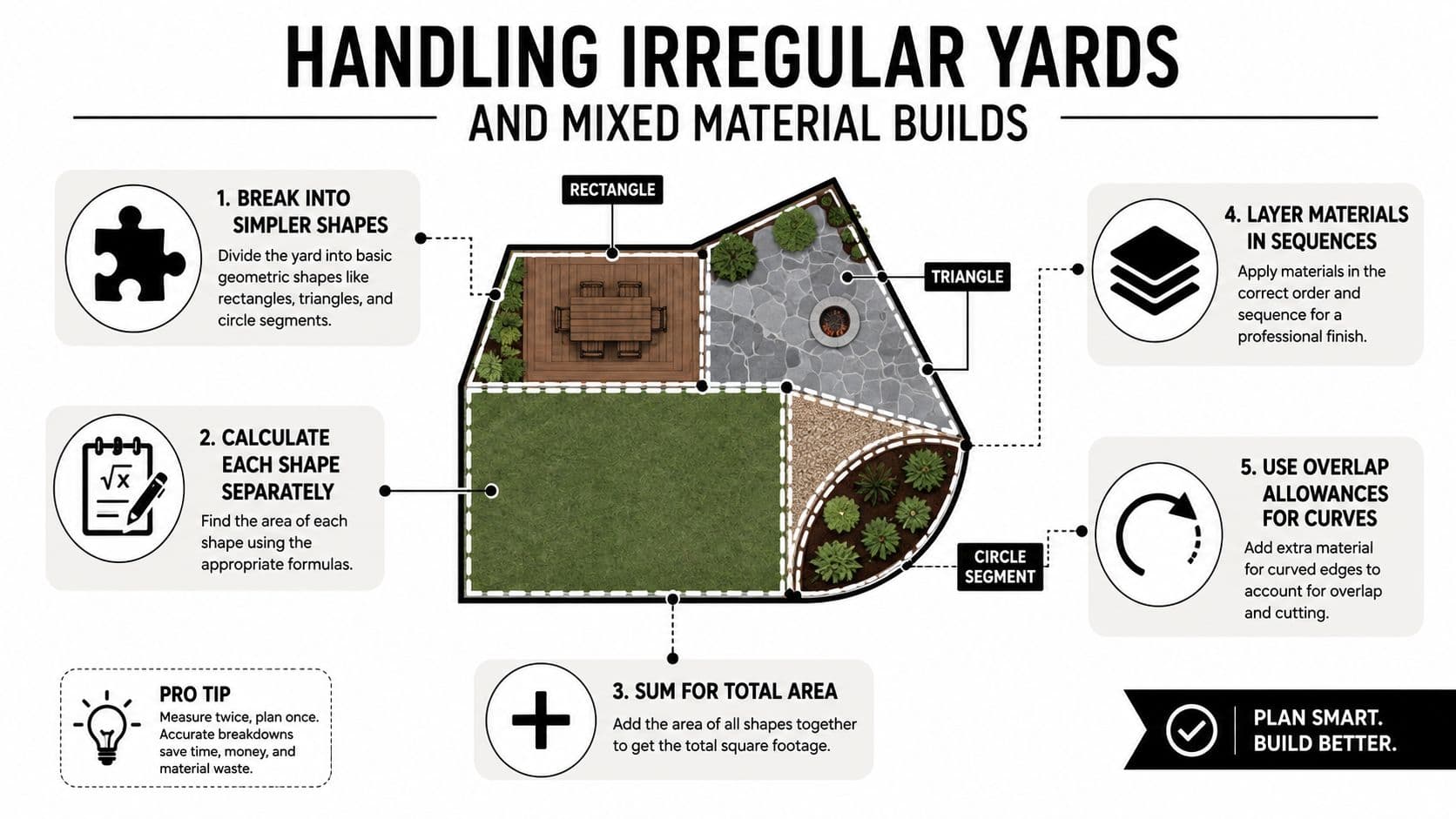
Start with a top-down sketch and divide each irregular area into manageable shapes:
- Rectangles for straight beds, patios, and lawn strips.
- Triangles for angled corners and tapering sections.
- Circles or circle segments for tree wells and rounded beds.
Calculate each shape, then add the areas that use the same material. For a curved bed, a close approximation is safer than treating the entire space as a rectangle and ordering for area that does not exist. The irregular-area calculation resource also recommends breaking unusual footprints into smaller shapes, a practical step basic calculators often leave out.
Label every section after dividing the area. A planting bed may receive mulch, the adjacent path gravel, and the patio two paver sizes. Keep those quantities separate even when the zones touch. Material boundaries, not physical proximity, should control the estimate.
Treat layers as separate estimates
A gravel path over fabric and compacted base requires separate calculations. Each layer has its own purpose, depth, and ordering allowance. Estimate the base, finish material, and fabric as individual lines so the crew can purchase and install them correctly.
Transitions add another source of error. Gravel may need extra width at an edge, fabric needs overlap for seams, and pavers need bedding material beneath them. A single total for the complete footprint hides those requirements and makes a short order more likely.
Choose the buffer by the type of risk
Extra material protects against different losses:
- Cuts and breakage affect pavers and hardscape edges.
- Trimming loss affects sod around curves and obstacles.
- Settling and compaction affect loose soil, aggregate, and layered paths.
- Measurement uncertainty affects every irregular footprint.
Use the allowance that matches the material and construction method. Pavers need coverage for cuts and breakage, while soil and aggregate may need more because compaction changes the installed depth. Sod around curves and obstacles creates more scraps than a simple run, as noted in the earlier coverage guidance. The right question is what could leave the crew short, not which single allowance looks safest.
Ordering question: Are you protecting against cuts, settling, irregular measurement, or all three?
A useful calculator lets you override the buffer and assign different allowances to individual layers. If it returns one rounded quantity for a mixed build, rebuild the estimate by material and layer. The final order should match the sequence and conditions of installation, not merely the total footprint.
Choosing the Right Calculator for Your Project Type
A calculator that handles one rectangular bed may fail on a yard with curved edges, several material zones, or layers that change from one area to the next. Choose the tool by the work it must support, then verify that its output can be tied back to the drawing.
Match the format to the job
| Calculator format | Works well for | Blind spot |
|---|---|---|
| Free web calculator | A quick mulch, soil, gravel, or sod estimate | Often handles one area and one material at a time |
| Multi-module mobile app | Switching between bulk, paver, sod, and turf calculations | May still require manual mapping of irregular sections |
| Design tool with estimating features | Connecting a visual plan to material zones | Requires more planning before the estimate becomes useful |
Multi-module apps can cover soil, mulch, concrete, pavers, retaining walls, grass seed, and sod, with measurements entered in centimeters, meters, feet, inches, or yards, as noted in the earlier app reference. That range is useful when product specifications and site measurements use different units. It still does not divide a curved or irregular yard into reliable sections. Do that manually, or choose a tool that lets you assign separate zones.
For a renovation with several materials, connect the quantity estimate to a visual plan. A photo-based concept can reveal a missing bed, an oversized patio, or a poor transition before the estimate becomes an order. OutdoorBrite's landscape design software represents a design-linked estimation tool, where the visual layout helps organize the zones that feed the material takeoff.
A material total is only one part of the budget. Delivery, labor, handling, and other project lines can change the decision even when the calculated volume is correct. These realistic renovation budgeting tips from Trademaster Construction help keep quantities connected to the wider renovation worksheet.
Use a simple calculator for a simple shape and one material. Use a multi-material workflow when gravel meets pavers, soil changes depth, or several surfaces share one project. Use a design-linked process when the contractor needs to see exactly which zone each quantity describes. The app reference mentioned earlier can be useful for quick checks, but irregular work still depends on your zone map and material-by-material review.
Turning Calculator Outputs Into a Real Project Plan
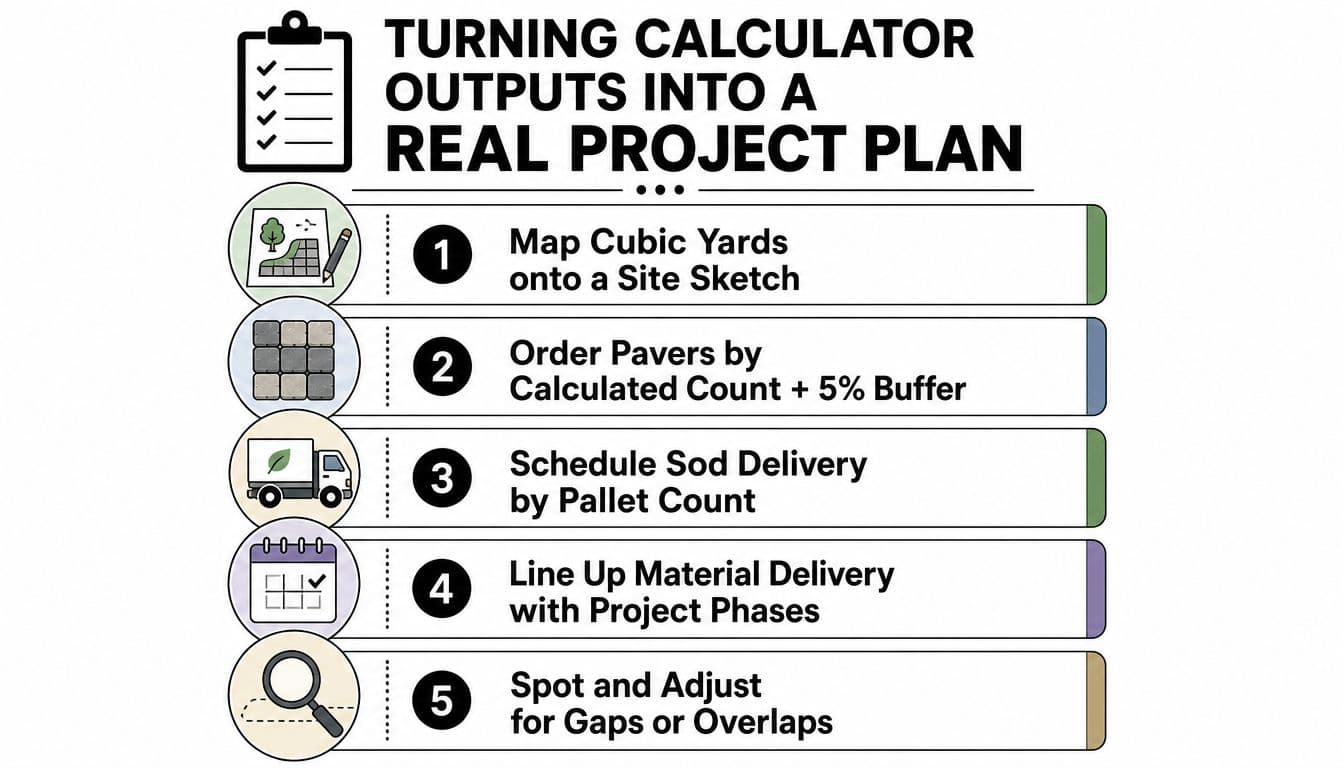
A quantity without a location is still a guess. Put each cubic-yard figure, paver count, and sod pallet estimate onto a site sketch, then mark where deliveries will be staged and which material arrives first.
Use this final check before ordering:
- Confirm every area and subtract permanent obstacles.
- Verify depth and unit conversions.
- Assign waste or compaction allowances by material.
- Round up to complete supplier units.
- Compare the quantities with the drawing and installation sequence.
Use a design concept to review transitions before delivery. OutdoorBrite's garden ai design can help place a visual direction beside the measurement work, while a separate supplier conversation may be useful if you also need to get help with your deck supply list. Bring both the sketch and the calculator summary to the contractor meeting.
Upload a photo of your yard to OutdoorBrite, test the layout and material zones, then use the resulting plan to check your mulch, paver, gravel, or sod quantities before ordering. Turn the calculator output into a design your contractor can price and build.
See your yard reimagined
Start creating