Best Free Landscaping Design App for 2026 Compared
Find the best free landscaping design app in 2026. Compare free tiers, real limits, and which tools actually plan a full yard without a paywall.
Most roundup posts still sell the same lazy idea, that the best free landscaping design app is the one with the biggest feature list. That's the wrong test. A free app only matters if it gets you from a rough idea to a plan you can use before the paywall shows up and kills your Saturday.
| App | Free Project Size | Export Quality | Visualization | Plant Database | Verdict |
|---|---|---|---|---|---|
| Planner5D | Usable free tier, web and mobile | Good for layout, not photo-real | 2D and 3D | General home catalog | Free for execution if you want scale |
| iScape | Up to 2 saved designs in the free version | Limited on free tier | Photo-based layout, AR preview | Stronger in paid tiers | Free for inspiration, then paywall |
| SketchUp Free | Full browser-based modeler | Strong for geometry and sharing | 3D modeling | Not landscape-specific | Free for execution if you can model |
| Home Outside | Free app with optional packs | Simple sketch-style output | Drag-and-drop canvas | Designer element library | Good for fast concepts |
| PRO Landscape Home | Free app with about 100 items | Before-and-after mockups | Photo composite | Small free library | Good for quick visual mockups |
| DreamzAR | Limited free tier | Depends on device and plan | AR walk-through, 3D objects | Style and plant library | Strong for preview, weaker for specs |
| Roomsketcher | Free tier is limited | Depends on output level | Floor-plan style, not yard-first | General design tools | Better for buildings than yards |
My rule: if you can't export a plan, share it cleanly, or keep working after the second or third save, it's not a real project tool. It's a teaser.
Table of Contents
- Why Free Landscaping Apps Are More Frustrating Than They Should Be
- Five Criteria That Actually Separate Good Free Apps From Bad Ones
- The Top Free Landscaping Apps Compared Side by Side
- How a Real Yard Project Moves From Sketch to Finished Plan
- Where the Free Tiers Break and What Upgrades Really Cost
- App-Style Planners vs Browser 3D Modelers vs Photo-Based AI Tools
- Which Free App Fits Your Specific Situation
- Your First Download and What to Do With It
Why Free Landscaping Apps Are More Frustrating Than They Should Be
The word free gets abused in this category. You download an app because a list promised a no-cost yard planner, then you spend an hour dragging plants, patios, and paths into place only to find out the useful part is locked. Save limits, watermark exports, thin catalogs, and missing 3D views are the usual traps, and they show up exactly when the project starts to feel real.
The usual failure pattern
The cycle is painfully predictable. First, you sketch the yard and feel productive. Then you try to save a second version, export a clean image for your spouse, or compare the layout in 3D, and the app asks for money. In a lot of tools, the free tier is enough to inspire you, but not enough to finish the actual plan.
That's why homeowners get annoyed. They don't ask, “Which app is technically free?” They ask, “Can I finish my yard without hitting a wall halfway through?” The answer changes fast once you start testing save limits, export quality, and the plant catalog instead of trusting the marketing copy.
Inspiration is not execution
There's a real difference between a pretty mockup and a workable plan. A tool can show you a convincing patio, but if it can't keep measurements straight, let you save enough versions, or show the yard from more than one angle, you're still guessing. Planner5D is useful because its free tier works on web and mobile and supports 2D and 3D layout to scale OutdoorBrite's free-app guide. SketchUp Free is different, because it gives you a true browser-based 3D modeler with 10 GB of cloud storage and access to 3D Warehouse, but it takes more effort to learn SketchUp Free analysis.
The market reflects that this isn't a tiny hobby niche. Recent industry estimates put the Virtual Yard Design App market at USD 1.16 billion in 2025, projected to reach USD 3.49 billion by 2034, and the global Garden Planning App market at USD 1.38 billion in 2025, projected to reach USD 4.61 billion by 2034 market report. That growth exists because people want tools that survive beyond a first draft.
If a free app can't get you from layout to a usable handoff, it's not a bad app, it's a free teaser dressed up as software.
Five Criteria That Actually Separate Good Free Apps From Bad Ones
Start with limits, not slogans
Before you download anything, test the app against five simple checks. Don't ask whether it looks polished in screenshots, ask whether it survives a real yard job. Draw a 20-by-30-foot bed, try to save it, try to export it, and see what the free tier blocks.
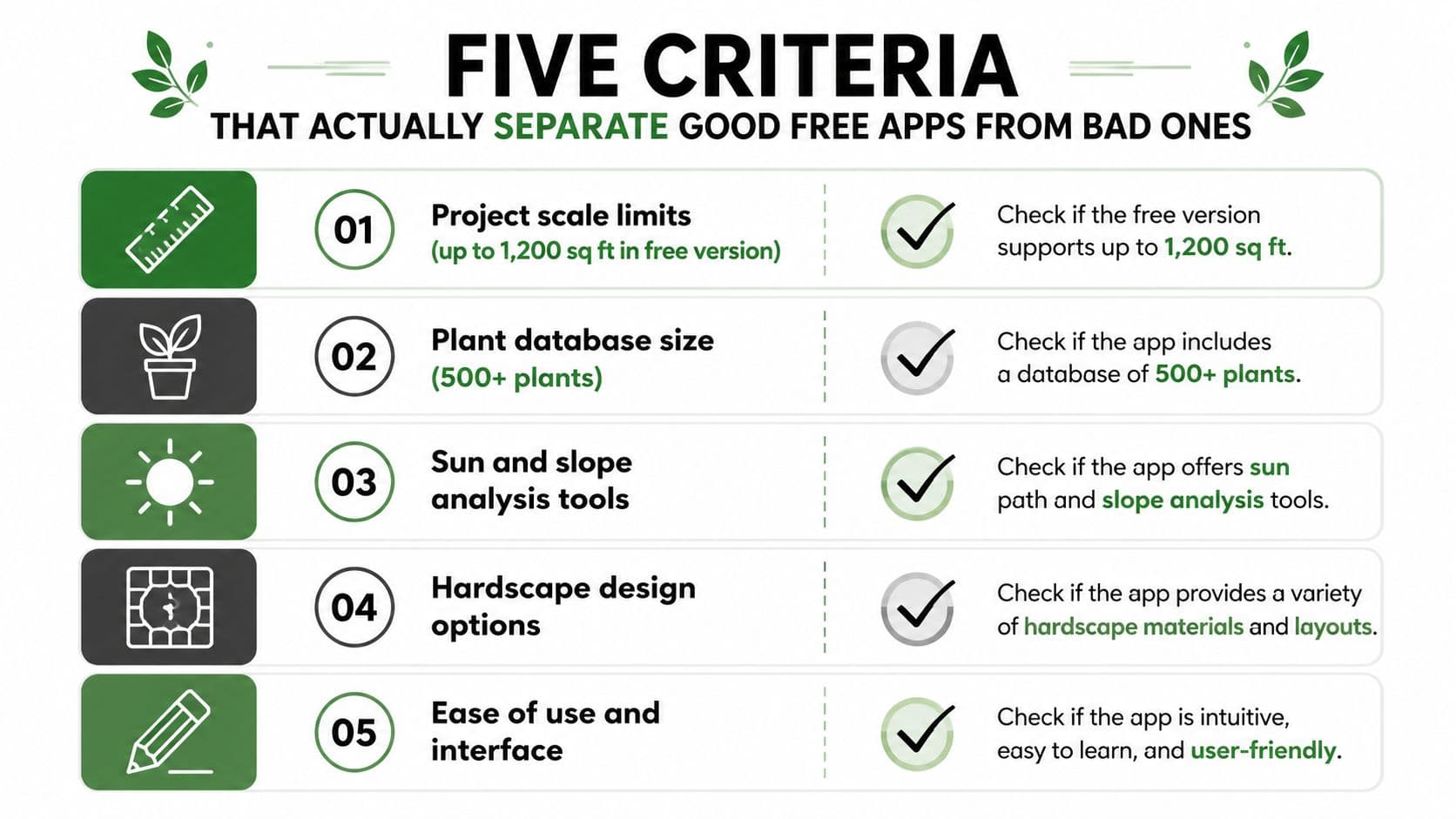
Use these five checks every time
- Project scale limits: Try a real section of yard, not a tiny sample. If the app forces a cap on saved designs, object counts, or yard size before you finish the first bed, you already know the free tier won't carry the project.
- Export and sharing: Save the design, then ask whether you can send it to someone cleanly. If the file comes out watermarked, low quality, or locked behind a paid plan, the app is only useful for private brainstorming.
- Measurement accuracy: Check whether the app gives you manual scale control, photo tracing, or any measurement support. A pretty yard sketch is useless if the dimensions drift.
- Visualization depth: See if the app stops at 2D or if it gives you 3D or AR. A flat layout can hide bad circulation, awkward sightlines, and spacing problems.
- Plant database realism: Look for mature size, region filtering, and more than generic stock images. If the plants all look decorative but act like clip art, you'll still need another source to know what belongs in your climate.
What the free tier should prove
A good free app should answer one question, can you make a believable first draft without paying? That means a usable save, a tolerable export, and enough plant or material options to keep the concept honest. iScape is a perfect example of freemium discipline, because its free version lets users save up to 2 designs and then starts pushing serious users toward paid access iScape listing.
If the free version can't show scale, save your work, and share a clean image, don't build your weekend around it.
The Top Free Landscaping Apps Compared Side by Side
The short version
The apps below fall into two camps. Some are free for inspiration, meaning they'll help you explore ideas but pinch off the useful parts quickly. Others are close to free for execution, where you can finish a rough plan before anyone asks for a card.
| App | Free Project Size | Export Quality | Visualization | Plant Database | Verdict |
|---|---|---|---|---|---|
| Planner5D | Usable free tier, works on web and mobile | Solid for planning | 2D and 3D to scale | General catalog | Strongest free all-rounder |
| iScape | Free version saves up to 2 designs | Limited without upgrade | Photo-based, AR-capable | More useful in paid tier | Great for phone-first mockups |
| SketchUp Free | Full browser access | Strong geometry, cloud sharing | Full 3D modeler | No landscape-specific planting logic | Best for custom dimensions |
| Home Outside | Free app, optional packs | Simple, illustrative output | Drag-and-drop design canvas | Designer-style element library | Fast concept sketching |
| PRO Landscape Home | Free app with about 100 items | Before-and-after photo composite | Photo overlay | Small starter library | Good for quick visual proof |
| DreamzAR | Limited free tier | Varies by device and plan | AR walk-through and 3D placement | Style-heavy rather than builder-heavy | Better for previews than bids |
| Roomsketcher | Limited free tier | General design output | Floor-plan style | General objects | Not a yard-first tool |
Planner5D is the most practical free pick for most homeowners because it's a usable free tier, not a bait-and-switch demo free-app guide. SketchUp Free is the most capable browser-based modeler, but it's a different job, more geometry, less convenience free-app analysis. If you want a clean source of “what should I compare against later,” start with top landscape design apps and use it as a broader reference list.
For people who also care about yard automation after the design phase, it's worth comparing the design workflow with compare robot lawn mowing options, because a clean layout can help you think through mowing paths, edges, and maintenance access before you commit to plant beds.
The blunt takeaway is this, iScape and PRO Landscape Home are best when you want a fast visual concept, Planner5D and SketchUp Free are better when you need an actual plan, and the rest sit somewhere in between.
How a Real Yard Project Moves From Sketch to Finished Plan
A backyard project never starts inside an app. It starts with a tape measure, a notepad, and a rough idea that may be wrong. For a 1,200-square-foot backyard renovation, the first useful move is still the old-fashioned one, sketch the space on graph paper and mark what already exists.
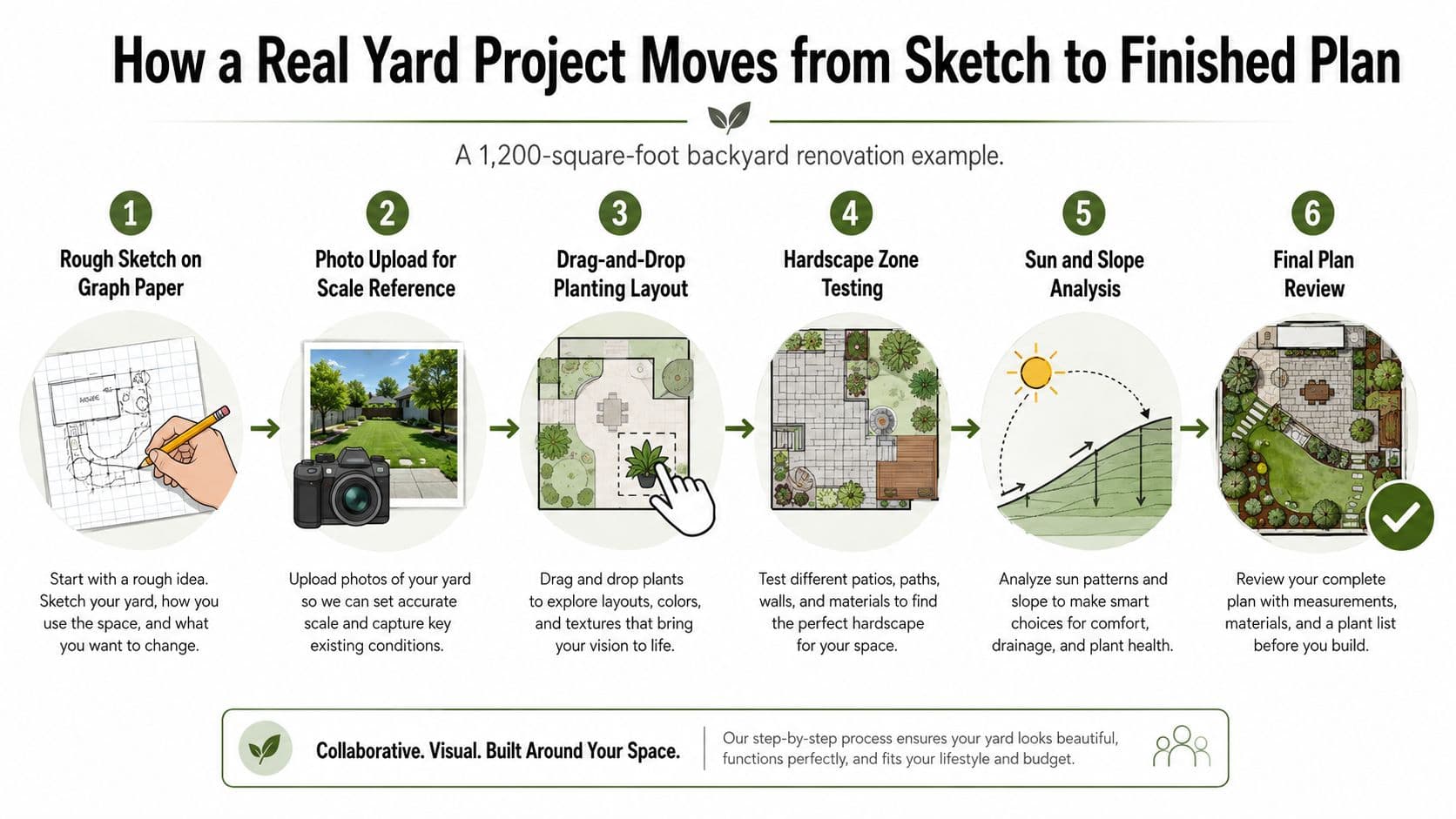
Where each type of tool fits
The photo-first apps are useful early. iScape works well when you want to stand in the yard, place plants and hardscape by hand, and preview the idea on-site in AR. That makes it a strong choice for the rough mockup stage, especially when you're trying to see whether a path, a seating area, or a planting bed feels too crowded.
Once the project turns technical, Planner5D and SketchUp Free take over. Planner5D is better when you want to draw to scale and keep moving between 2D and 3D without a steep technical setup Planner5D summary. SketchUp Free is better when the contractor will care about geometry, structure, or exact dimensions, because it's a real browser modeler with cloud storage and access to reusable assets SketchUp Free analysis.
The handoff moment matters
The usual stall point is not the first drawing, it's the handoff. Homeowners often get stuck when they need a second saved version, a cleaner export, or a plan that a contractor can read without guessing. PRO Landscape Home helps with quick photo-based mockups, and Planner5D helps when you need a more orderly layout, but the project gets serious when you need a dimension-true draft instead of a pretty screen.
Practical rule: use the visual app to answer “Do I like the look?” and the dimension app to answer “Will it fit?”
That split keeps you from paying for the wrong thing too early. It also keeps you honest about what a free tier can do, because a lot of apps are fine until you ask them to behave like a construction tool.
Where the Free Tiers Break and What Upgrades Really Cost
The paywall usually arrives at the exact moment the project stops being fun. The second saved yard, the full plant library, the contractor export, the high-resolution render, or the second zone in the yard is where many apps stop being generous. That's not accidental, it's how freemium is built.
The triggers that push you to pay
| Paywall Trigger | Typical Free Limit | Upgrade Tier Price |
|---|---|---|
| More saved projects | Often capped at a tiny number of designs | Consumer PRO plans often land around $30 per year in the market's app tiering iScape listing |
| Full plant library | Starter catalog only | One-time add-ons can appear in the low-cost range, like $14.99 for a larger library PRO Landscape Home pricing |
| Better exports | Watermarked or low resolution | Premium tiers often unlock cleaner sharing and HD output Planner5D pricing summary |
| Larger projects | Single-zone or limited layout | Prosumer tools can jump to over $300 per year pricing summary |
| AI or photo edits | Limited credits or starter designs | Credit systems charge per generation, so repeated experimenting adds up pricing summary |
The pattern is consistent. Free tiers are tuned for one simple sketch. Paid tiers provide the second pass, the second zone, or the export you need to share. That's why tools like Planner5D and SketchUp Free stay attractive, they let you keep working longer before the budget conversation starts Planner5D summary.
Read the upgrade by the job, not by the app
A cheap upgrade is worth it if it saves you from guessing wrong on a real project. A costly upgrade is a bad idea if you're still just exploring shapes and moods. If an app asks you to pay for the first clean export or the first accurate plant schedule, it's probably not the right free tool for a homeowner who only needs one weekend of real planning.
App-Style Planners vs Browser 3D Modelers vs Photo-Based AI Tools
Three categories, three different jobs
The market splits cleanly once you stop looking at app names and start looking at workflow. App-style planners are touch-friendly and quick. Browser-based 3D modelers are more technical but more honest about scale. Photo-based AI tools are the fastest way to get a convincing concept from an actual yard photo.
| Category | Best Free Example | Strongest Criterion | Weakest Criterion |
|---|---|---|---|
| App-style planners | iScape | Fast drag-and-drop on a phone | Save limits and paywalls |
| Browser 3D modelers | SketchUp Free | Custom geometry and scale | Learning curve |
| Photo-based AI tools | REimagine Home or similar photo restylers | Fast visual concepting | No contractor-ready dimensions |
App-style planners are for people who want to stand in the yard and move things around. iScape is the obvious fit because it works from a photo and supports AR, but the free tier is narrow and the serious features sit behind paid access iScape summary. That makes it good for the front end of a project and weaker for the finish line.
Browser 3D modelers are for people who care about dimensions more than instant beauty. SketchUp Free is the strongest free example because it gives you real 3D control in the browser, plus access to a large model library and cloud storage SketchUp Free analysis. It is not fast, but it is trustworthy when the yard layout has to be right.
Photo-based AI tools give the quickest visual answer. They're ideal when you already have a yard photo and want a fast concept render, not a measurement file. That's exactly where ai garden design software belongs in the conversation, because AI can show you the feel of a redesign long before you worry about exact plant counts.
Most serious projects use two categories, not one. AI for inspiration, then a measured planner for execution.
Which Free App Fits Your Specific Situation
Match the app to the job
Don't pick a tool because it's popular. Pick it because it fits the way you work. A homeowner doing one backyard refresh has different needs from a DIYer drawing patios and retaining walls, and both are different from a pro who just needs a quick client mockup.
| User Situation | Primary App | Backup App | Likely Upgrade Point |
|---|---|---|---|
| Single backyard makeover | iScape | PRO Landscape Home | When you need more saved designs or a fuller plant library |
| Full-yard hardscape project | SketchUp Free | Planner5D | When you need easier presentation or faster layout changes |
| Contractor-facing concept plan | Planner5D | SketchUp Free | When you need cleaner exports or more advanced rendering |
| Fast photo concept for inspiration | Photo-based AI tool | PRO Landscape Home | When you want repeated edits or higher-resolution output |
| Beginner testing a simple layout | Home Outside | Planner5D | When the project needs scale and repeatable edits |
For a homeowner sketching one yard, iScape is the more intuitive phone-first choice because it lets you build directly on the photo and preview the layout in AR iScape overview. For a DIYer building a more serious outdoor project, SketchUp Free is the better long game because it handles custom geometry and dimensioning without forcing a subscription SketchUp Free analysis.
If you're giving a client something polished, Planner5D is the safer starting point because the free tier is usable and the 2D-to-3D workflow keeps the presentation clean Planner5D summary. The first paywall usually arrives when you want a cleaner export or a more advanced look, not when you're still roughing out the idea.
Your First Download and What to Do With It
Pick one app and draw your yard, not a fantasy version. Measure the space with a tape and notepad, photograph it from all four corners, and place the existing trees, beds, doors, and fences before you add anything new. Spend ninety minutes on that first pass, because accuracy matters more than style at the start.
A good first download is the one that matches your situation above. If you want a simple entry point, use one of the simple outdoor design programs and see whether it survives the first save, the first export, and the first attempt to make the yard look believable.
When the free tier blocks the next step, write down exactly what it blocked. If it's a second saved project, a 3D view, or a larger plant catalog, you've found the boundary. At that point, compare the upgrade price to the cost of guessing wrong on a planting bed, a patio, or a hardscape change.
OutdoorBrite turns a photo of your yard into realistic redesign concepts in the browser, so it fits naturally into the same decision process as the apps above. If you want a faster way to test style ideas before you commit to a layout, visit OutdoorBrite and compare it against the free tools you've just narrowed down.
See your yard reimagined
Start creating