

7 Virtual Staging Photos to Study
Compare 7 virtual staging photos and tools by realism, speed, property type, and workflow, with practical tips for creating better listing visuals.
A polished room isn't automatically a convincing listing image. Furniture can look attractive while violating the room's perspective, scale, lighting, or intended use. The strongest virtual staging photos preserve the property's architecture and visual logic first, then add design that helps buyers understand how the space could work.
This comparison evaluates seven options through realism, editing control, turnaround, scalability, property-type fit, consistency across views, and disclosure needs. It includes designer-led services, AI-first workflows, hybrid platforms, and an outdoor visualization tool, because a backyard or patio can influence a property's presentation just as much as an empty living room. The wider shift is commercially significant: industry summaries place virtual staging at roughly 80% to 97% less than traditional staging, with AI-assisted workflows often priced around $1 to $15 per photo or approximately $2 to $5 per room, while physical staging can cost thousands per listing (Roomagen's 2026 virtual staging analysis). For software comparisons and broader workflow context, see this guide to 2026 virtual staging software.
Table of Contents
- 1. OutdoorBrite
- 2. BoxBrownie
- 3. VirtualStaging.com
- 4. PadStyler
- 5. VirtualStaging.ai
- 6. VRX Staging by VRX Media
- 7. Styldod
- Top 7 Virtual Staging Photo Services Comparison
- Turn Better Examples Into Better Listings
1. OutdoorBrite
OutdoorBrite solves a problem most interior-focused staging tools largely ignore: showing how an unfinished yard, patio, garden, or front entry might function. It transforms a photo of the actual outdoor space into redesign concepts, so the house, property boundaries, existing layout, and viewpoint remain central rather than becoming generic landscaping illustrations.
The workflow is especially useful for comparing directions before committing to a project. Users can select from 50+ styles, including modern, Mediterranean, Japanese Zen, xeriscape, tropical, and cottage concepts, then refine the result with elements such as fire pits, pergolas, planting beds, pools, and decks. The company says users can receive initial concepts in seconds, with many first designs appearing in roughly 12 seconds, and several high-resolution concepts can be generated in under a minute. Those product claims describe the tool's workflow, not a guarantee for every upload, because source-photo quality still affects the result.
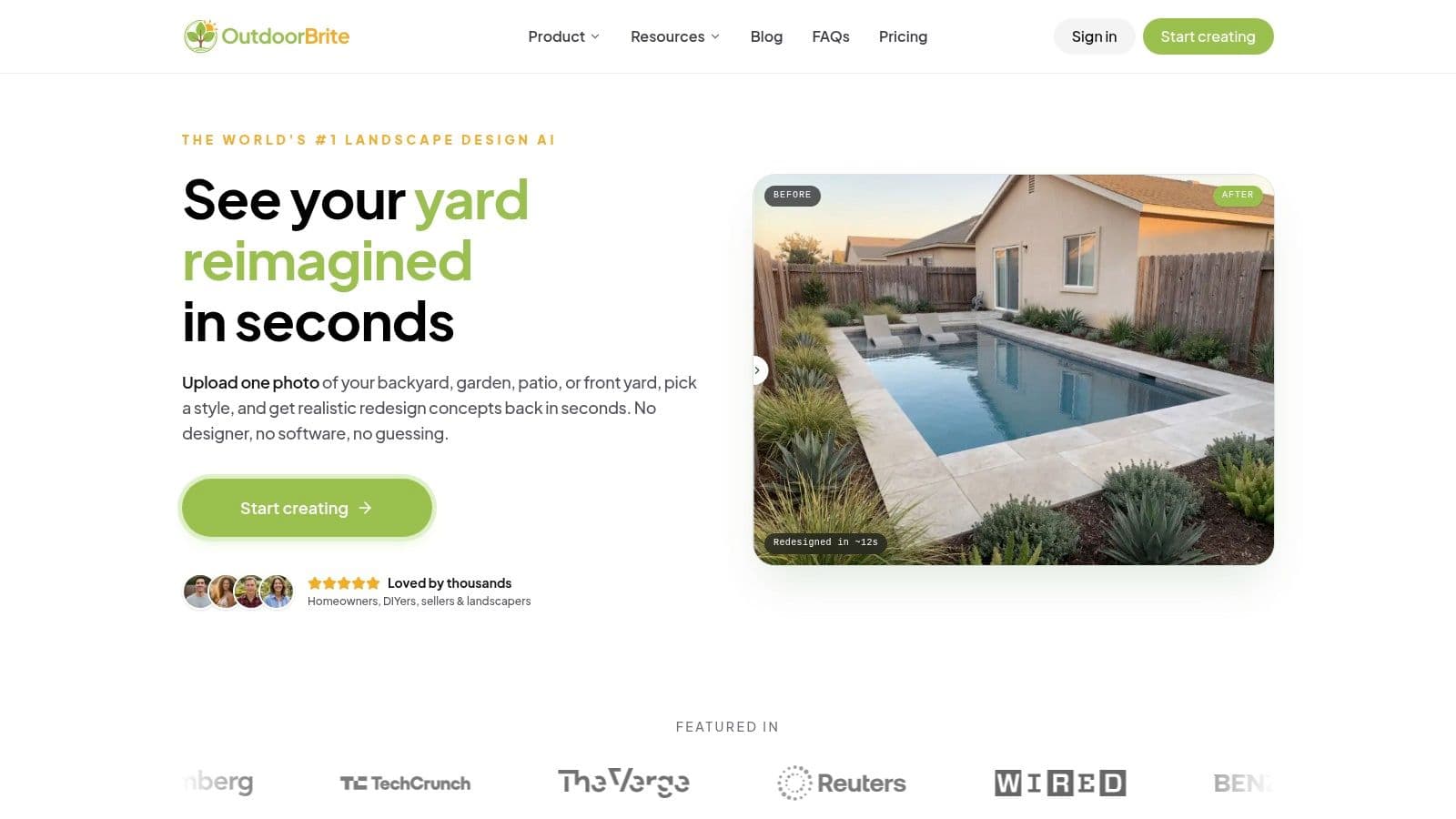
Best fit for outdoor visual merchandising
OutdoorBrite offers more control than a one-click concept generator. Its elements editor lets homeowners, agents, DIYers, and landscaping professionals test specific additions against the original space. That matters when the visual problem isn't “make this yard prettier,” but “show whether this patio can support outdoor seating,” or “help a buyer understand the potential of this blank garden.”
The tool also connects visualization with planning through idea galleries, planting guidance, a landscaping glossary, and calculators for mulch, pavers, and sod. Users looking specifically for ai for garden design can treat the generated image as an informed conversation starter rather than a construction document.
Practical rule: Use the original yard photo to test layout and atmosphere, but don't treat a concept image as proof of grading, drainage, structural feasibility, planting performance, or permit compliance.
Realism and credibility checks
The advantage is photo-based context. The limitation is that outdoor redesigns remain concepts, not technical plans. Agents should disclose altered imagery when the image is used in a property listing, and sellers should avoid implying that every visible feature already exists. OutdoorBrite uses subscription plans rather than a free tier, with higher-resolution downloads and tiers that scale by design volume, team access, and output needs. The practical fit is strongest when the goal is to explore or communicate a possible outdoor experience quickly, then hand technical decisions to an appropriate professional.
Website: OutdoorBrite
2. BoxBrownie
BoxBrownie takes the opposite approach from an instant AI generator. Human designers create the staged image, which makes the service a strong fit when the priority is controlled realism across important listing photos rather than rapid experimentation.
The platform is known for virtual staging of interiors and exteriors, alongside related listing-media work such as twilight edits, item removal, floor plans, and renders. That breadth reduces vendor switching for agents who need more than furniture added to an empty room. The workflow is order-based, with no subscription requirement, so a user pays for the requested work instead of maintaining a recurring plan.
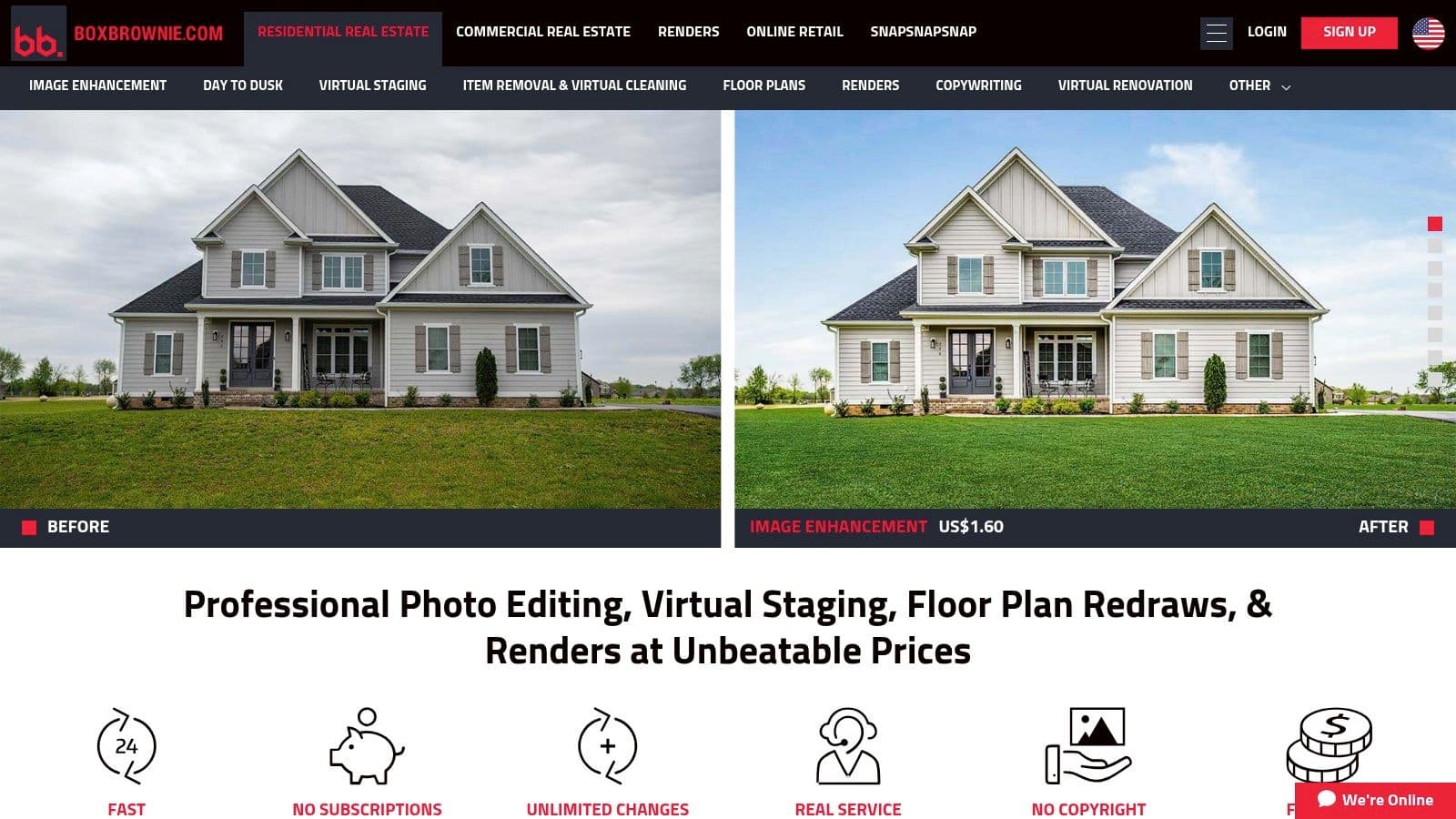
Where human control earns its keep
A designer-led process is useful when the source image has awkward perspective, mixed lighting, unusual architecture, or a room that needs restraint. The operator can select furniture that respects circulation and scale, rather than just filling open floor area. That human judgment is also valuable for exterior images, where inserted objects need to sit convincingly on patios, decks, lawns, and hardscape.
Typical delivery is described as 24 to 48 hours, so BoxBrownie isn't the natural choice for an immediate upload-and-publish workflow. It's better suited to an agent who can plan the listing-media order and wants a repeatable editing relationship.
The more unusual the room, the more valuable a human review becomes. A technically sharp image can still fail if the furniture blocks the room's intended route.
Practical fit
BoxBrownie works well for standard residential listings, photographers who want a broad post-production partner, and teams that prefer predictable ordering over software experimentation. The trade-off is scalability by budget. Per-image ordering can become expensive across a large photo set, especially when a listing needs several rooms, revisions, and supplementary edits. Before ordering, check whether the selected furniture style remains consistent across angles and whether the provider's disclosure guidance matches the MLS or marketplace where the image will appear.
Website: BoxBrownie
3. VirtualStaging.com
VirtualStaging.com is built for the agent who has a deadline measured in hours, not days, but still wants a designer-led result. Its standard service promises delivery in a 4 to 8 hour window for up to 15 photos during weekday business hours, giving it a different operational position from services with longer standard turnaround.
The company uses human staging through a proprietary rendering workflow and includes unlimited revisions with a money-back guarantee. That combination shifts the evaluation from “How fast can the software produce a draft?” to “How quickly can a professional team produce a publishable image and correct problems if the first version misses?”
Speed without surrendering review
Fast service is only useful if the output survives inspection. Look closely at chair and table legs, contact shadows, window reflections, ceiling fixtures, and the relationship between inserted furniture and door openings. A rapid human workflow can address those issues through revisions, while an automated workflow may require the user to catch them independently.
VirtualStaging.com also supports optional 360-degree photo staging, plus removal and renovation add-ons. That makes it more suitable for listings where the still image is only one part of a broader media package. Complex removal or renovation work can extend the timeline to 8 to 24 hours, so the advertised fast window shouldn't be applied to every request.
The right buyer
This option fits agents who need same-day staging, photographers with urgent delivery schedules, and teams that value revision access more than the lowest possible per-image cost. Tiered discounts can help with multi-photo orders, but the service remains more expensive than DIY AI tools. For a broader look at automated and assisted workflows, this OutdoorBrite tool review list provides useful comparison context without changing the central test: does the image remain credible when viewed beside the rest of the listing?
Website: VirtualStaging.com
4. PadStyler
PadStyler is useful because it combines two different answers to the same visual problem. Users can choose instant AI staging and remodeling for speed, or commission bespoke, human-designed staging when the room requires greater control. That hybrid structure is more practical than treating every listing as either a software job or a traditional editing order.
The AI plans include staging, remodeling, backyard design, furniture removal, and tools intended to support consistency across multiple views. Bespoke work adds unlimited revisions, rush delivery, and a price-match promise. The platform also extends into 3D renders and Matterport tour staging, although those advanced services cost extra.
A platform for mixed listing needs
A vacant condominium may be suitable for an AI draft that establishes furniture placement quickly. A high-value property with complex millwork, unusual proportions, or a significant renovation story may justify the human route. Keeping both options in one platform can simplify vendor management, but it doesn't remove the need to choose the right workflow for each image.
Monthly AI plans have photo limits, and unused credits reset monthly. That matters for agents whose inventory changes unpredictably. A subscription can be efficient for regular volume, but it may be a poor fit for occasional sellers who only need a few images.
Workflow test: Ask whether the platform can keep the same furniture, palette, and room logic across every angle before you approve a full listing set.
Where it fits
PadStyler is strongest for teams that want a bridge between instant experimentation and professional production. It also suits projects that move from a still image into renovation visualization or a virtual tour. The main checks are plan limits, extra charges for advanced formats, and whether the AI output needs human correction before publication.
Website: PadStyler
5. VirtualStaging.ai
VirtualStaging.ai prioritizes scale. Its one-click AI workflow can produce staged images in seconds, making it attractive to agents, brokerages, and agencies that need many concepts without sending every image through a designer.
The platform offers monthly plans for individual users and teams, along with done-for-you packages where a team applies the AI workflow with designer review. Its feature set includes furniture removal when combined with staging, unlimited revisions, watermark-free images, and a multi-angle room-consistency feature described as being in beta. The distinction matters: automation supplies the speed, while the assisted package provides an additional quality-control layer.
Low friction, higher responsibility
AI-first staging is most useful when the room is straightforward and the agent can inspect every output. A clean, well-lit interior with clear walls and conventional proportions gives the system less ambiguity to resolve. A room with reflective surfaces, built-in cabinetry, unusual windows, or a difficult camera angle demands more scrutiny.
The platform's plan structure includes Starter, Unlimited under fair-use terms, Studio for reseller-oriented work, and Quick Stage or Full Listing packages. Credits can roll over, and monthly plans may include designer-staged credits. Those conditions make it important to review usage rights and fair-use language before building a repeatable agency workflow.
Consistency is the deciding factor
The strongest use case isn't the fastest first image. It's the ability to create a coherent visual story across rooms and angles without introducing different furniture scales or conflicting design styles. Agents should compare adjacent views, inspect edges and shadows, and confirm that AI edits haven't changed architectural facts.
VirtualStaging.ai is a strong fit for high-volume, cost-sensitive production, but peak photorealism can vary against designer-led services. Use the automated route for speed, then reserve human-assisted packages for hero images or difficult rooms.
Website: VirtualStaging.ai
6. VRX Staging by VRX Media
VRX Staging suits users who want a predictable U.S.-focused service with clear ordering and disclosure guidance. Standard staging is delivered by the next business day, which places it between instant AI generation and longer designer-led queues.
The service is available beyond VRX photography clients, but it becomes particularly convenient for teams already using VRX Media for listing photography. Add-ons include virtual twilight, item removal, and a furniture-removal-plus-staging bundle. Custom requests can be supported through the team, while published policies clarify included and excluded work.
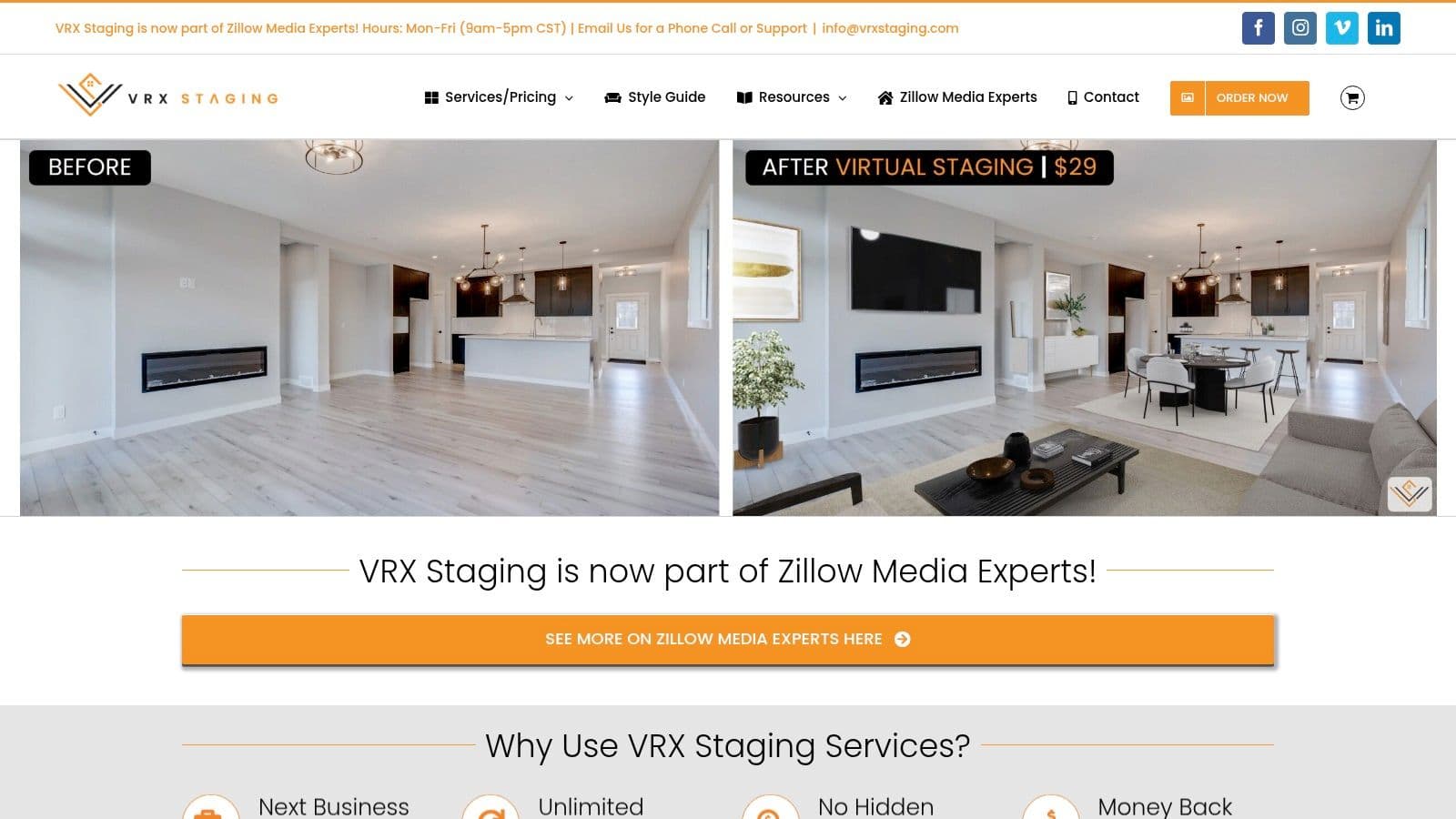
Policy clarity as a production feature
Disclosure guidance isn't administrative decoration. It affects whether a staged image can be used responsibly in a listing and whether the buyer understands what was altered. Industry guidance summarized by PhotoUp reports that 82% of buyer's agents say staging helps buyers visualize a property as their future home, while 41% say staged photos make buyers more willing to tour in person (PhotoUp's summary of real estate photography statistics). Those benefits make transparent presentation more important, not less.
VRX's next-business-day model works for planned listing launches, but same-day service isn't standard. Removal of walls, floors, or other substantial features costs extra and may extend delivery. That distinction is important because adding furniture is a lower-risk edit than changing the apparent physical condition of a property.
Practical fit
Choose VRX when timeline predictability, a U.S.-oriented service model, and policy visibility matter more than instant generation. For outdoor sellers, the same principle applies when you turn a photo into a landscape plan: use the image to communicate potential, then verify what exists and what can be built.
Website: VRX Staging
7. Styldod
Styldod is designed for breadth and volume. It combines human and AI workflows with a wide listing-media catalog that includes virtual staging, renovation visualization, occupied-to-vacant edits, day-to-dusk work, floor plans, and 360 tours.
That range makes it more than a staging vendor. A brokerage can use one partner for multiple media tasks while trying to preserve a consistent visual identity across a listing. The platform emphasizes designer-led staging with matching furniture and style across multiple angles, which addresses one of the most common weaknesses in AI-generated listing sets: each image may look acceptable alone but contradictory as a group.
A coherent listing story
The value of multi-angle consistency is practical. Buyers don't evaluate a living room, hallway, and dining area as unrelated images. They form a mental model of the property. Furniture that changes scale, color, or position without a physical explanation can weaken that model and make the listing feel digitally assembled.
Styldod's additional services can help teams maintain a broader production workflow, but the interface and plan options may feel complex for an agent who only needs basic staging. “From” pricing also means the exact cost depends on service type and bundle, so a direct quote is more useful than a headline starting price.
Who should choose it
Styldod fits brokerages, media teams, and agents who need more than one listing edit and want a vendor capable of handling multiple formats. It's less compelling for a single uncomplicated vacant room where a simple AI tool can generate and verify an acceptable draft. Before placing a large order, request a representative treatment and compare style consistency across the actual camera angles you plan to publish.
Website: Styldod
Top 7 Virtual Staging Photo Services Comparison
| Service | Process / Complexity 🔄 | Cost & Speed ⚡ | Expected Quality & Impact ⭐📊 | Best for / Use cases 💡 |
|---|---|---|---|---|
| OutdoorBrite | AI photo‑based generator with editable elements; subscription workflow | Subscription only; instant results (seconds–~12s); cost‑efficient vs hiring designer | High‑realism concept visuals that preserve layout; not construction plans | Homeowners, DIYers, pros needing fast concept visuals and planning resources |
| BoxBrownie | Human designer‑led staging with predictable per‑image workflow | Pay‑per‑image; typical 24–48 hr turnaround | Consistently photorealistic, MLS‑safe edits | Agents/photographers who want human‑crafted listing images and related services |
| VirtualStaging.com | Human hand‑staging via proprietary workflow; unlimited revisions | Higher cost than AI; 4–8 hr delivery on standard orders (fast option) | Very photorealistic with SLA and money‑back guarantee | Rapid same‑day needs where human quality and revisions matter |
| PadStyler | Hybrid platform (instant AI + bespoke human staging) with subscription & bespoke options | Mixed pricing: subscription credits for AI, extra for advanced 3D/Matterport; next‑day bespoke delivery | Flexible: instant AI quality or higher‑fidelity human/studio renders | Users who want both low‑cost AI and higher‑fidelity human work in one place |
| VirtualStaging.ai | AI‑first one‑click staging; optional designer‑review packages | Clear monthly plans; very low per‑image cost at scale; seconds turnaround | Fast automated results; photorealism can vary vs human services | High‑volume agents/teams or resellers needing low‑cost, instant staging |
| VRX Staging (VRX Media) | U.S. photo/media company with human staging and clear MLS policies | Next‑business‑day standard; add‑ons cost extra | Reliable, predictable outputs with published disclosure guidance | U.S. users wanting predictable timelines and policy transparency |
| Styldod | High‑volume service offering human + AI workflows and broad media services | Competitive starting prices; cost varies by service and bundle | Consistent multi‑angle styling and broad listing‑media coverage | Brokerages/teams needing one vendor for many listing‑media edits |
Turn Better Examples Into Better Listings
The best virtual staging photos aren't the ones with the most furniture. They're the ones that answer a buyer's practical question without pretending to show something that doesn't exist. Industry evidence supports staging as a visualization aid, with buyer-facing guidance reporting that 40% of buyers' agents say buyers arrange to see a home after viewing staged photos online (PhotoUp's real estate photography data summary). That makes the image part of the conversion path, but it also raises the cost of a misleading edit.
Start by matching the workflow to the property and deadline. OutdoorBrite is a natural fit for exploring a yard, patio, or garden on the property's actual photo. BoxBrownie, VirtualStaging.com, VRX Staging, and Styldod are better suited to human-reviewed or broader listing-media production. PadStyler offers a deliberate middle ground, while VirtualStaging.ai emphasizes automated volume with optional assistance.
Use a representative image before ordering a full set. Choose a room or exterior view that includes the difficult features, such as windows, reflective surfaces, tight circulation, architectural details, or an uneven lawn. Then inspect the output rather than judging it at thumbnail size.
- Check edges and perspective: Look for furniture legs that float, rugs that ignore floor lines, cutout halos, and objects that don't sit naturally on the ground.
- Compare scale: A sofa, dining table, pergola, or planting bed should fit the visible proportions and leave believable circulation.
- Match lighting: Shadows, highlights, color temperature, and window direction should agree with the source photograph.
- Review every angle: Furniture, materials, and style should remain consistent across the listing rather than changing from image to image.
- Confirm revisions: Know how corrections are handled, especially for hero images and complex removals.
- Verify disclosure rules: Label altered images clearly where the listing platform or local requirements call for it.
- Separate concepts from plans: Outdoor redesign visuals can guide a conversation, but structural, drainage, grading, planting, and permit-dependent work still requires the appropriate professional.
The market's expansion reflects a broader shift from manual staging toward scalable digital merchandising. One market projection places virtual staging solution software at USD 574.35 million in 2026 and USD 4.73 billion by 2035, with a projected 26.4% compound annual growth rate, while another estimates USD 359.48 million in 2024 and more than USD 2.96 billion by 2033, also using a 26.4% CAGR (Market Growth Reports' virtual staging solution market report). The growth makes tool choice more consequential. As automated imagery becomes easier to produce, the differentiator shifts toward control, consistency, credibility, and fit.
For outdoor redesign concepts, OutdoorBrite gives homeowners, sellers, and outdoor professionals a fast way to explore styles and elements on the actual yard. Visit OutdoorBrite to create photo-based concepts for backyards, patios, gardens, and front yards, then use the results to guide a more informed conversation with a contractor or outdoor professional.
See your yard reimagined
Start creating